Mastering Reflected Cross-Site Scripting & Bypassing Filters
Learn how reflected cross-site scripting (XSS) attacks work and how attackers bypass security filters. This blog covers real-world examples, payload techniques, and prevention tips to help you understand and defend against reflected XSS vulnerabilities.
Welcome Reader. In today’s article, we will master reflected XSS. Let’s start by learning what XSS is in general. We will be using OWASP Juice Shop to practice our XSS skills.
What is Cross-Site Scripting?
Cross-Site Scripting (XSS) is when a website accidentally treats user input as code instead of text, so an attacker can make the site run their JavaScript in other people’s browsers.
Think: someone puts <script>alert(1)</script> in a comment/search box, and when others view the page, it runs. That can let attackers steal sessions, change what users see, or perform actions as them.
Types of Cross-Site Scripting
- Reflected XSS (non-persistent XSS)
- Stored (Persistent) XSS
- DOM-Based XSS
What is Reflected Cross-Site Scripting?
Reflected cross-site scripting (XSS) (also known as non-persistent XSS) occurs when a malicious script is injected into a website through user input, and then immediately “reflected” back to the user in the website’s response. The user then unknowingly executes this script in their browser. It’s typically delivered through a malicious link, often disguised as a legitimate URL, that the user clicks.
Hunting for XSS: Find the Inputs First
When you land on a site, first map every user-controlled input. Click around and log search boxes, forms, comments, profile/profile-edit fields, file uploads (names), query parameters, and API endpoints. Use DevTools/Burp to see where values reflect (URL, HTML, attributes, JS, JSON/JSON-LD). This inventory becomes your hit list for XSS testing and payload crafting.

An example of reflected input can be seen in the screenshot below of a search result.

It is a possible XSS attack vector, so we can start preparing our malicious code to exploit it.
Exploit Building and Execution
When it’s time to prep exploits, don’t just copy/paste payloads from every cheat sheet and blast them at the site. That’s how you accidentally drop a stored XSS in production and end up explaining yourself. Spray-and-pray doesn’t even prove the site is vulnerable; it just creates noise.
I usually start with a payload <img src=x onerror=alert(1)> and note the output.
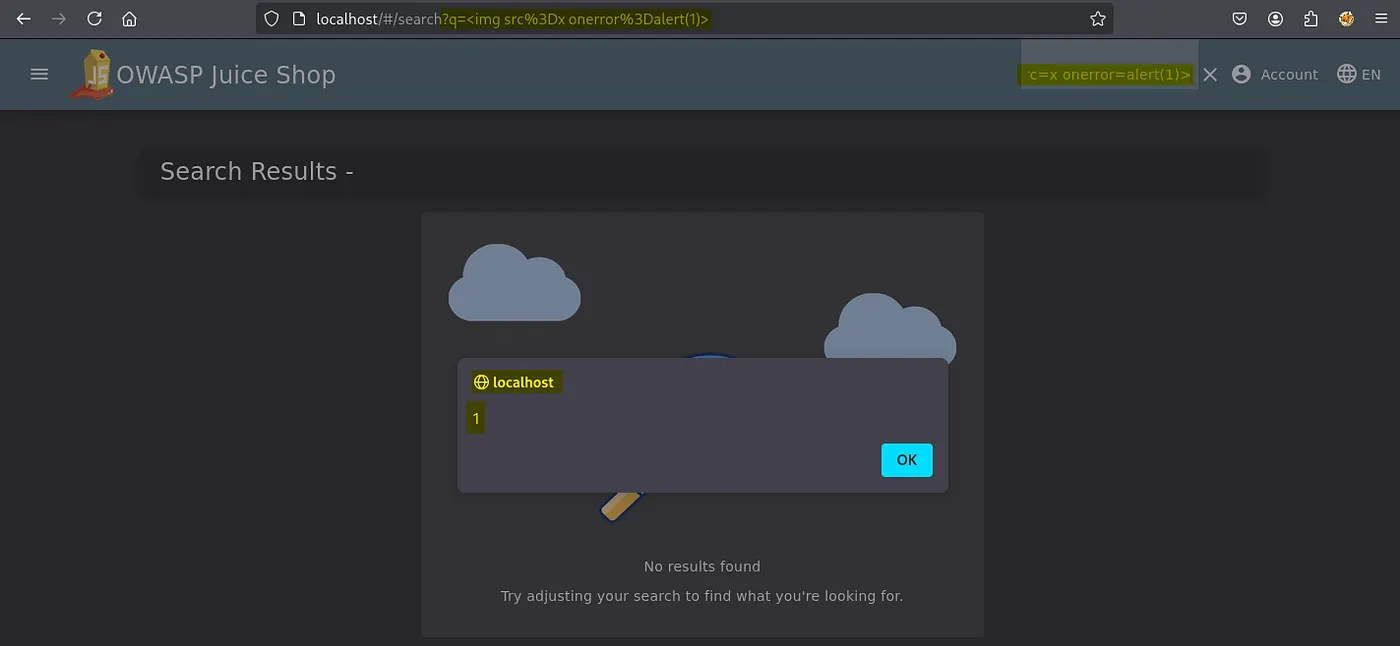
In the above screenshot, we successfully got an alert prompt from the browser confirming the site is vulnerable to Reflected XSS.
We will now try a different payload.
1
</script><svg/onload=alert(1)>

This did not execute, which tells us the input is not being injected inside a <script> tag. In this view, the value is likely placed in an HTML text/attribute context or HTML-encoded, so the </script> is treated as text. In some setups, a Content-Security-Policy may also block inline event handlers like onload, preventing this variant from firing.
Content Security Policy is a web security standard that helps prevent attacks like cross-site scripting (XSS). We will learn about this in another article and how to bypass sit.
Evading Filters: XSS Defense Bypasses
Now we’ll learn how to fingerprint the context (HTML, attribute, JS, URL), observe what gets encoded/decoded, and use that knowledge to craft minimal proof-of-control payloads.

Signature Bypass
Let’s say we insert this <script>alert(1)</script> payload on the website. If it prints the following </>It means the filter is encoding <> in our payload. We will then replace it with the following.
1
2
3
4
5
6
x" autofocus onfocus=alert(1) x="
// Works only if your input lands inside an attribute value and quotes aren’t encoded.

// Double-decode probe
<script>alert(1)</script>
// Only works if something decodes entities/URL-encodes after filtering.
Tag Blacklist Bypass
Sometimes the filters check the tags to detect and block our payload. If our payload is this <img onerror=alert(1) src=a> and getting blocked, we can try tweaking like the following.
1
<iMg onerror=alert(1) src=a>
This will only work with the weak filters. We can even go one step further and try even handlers to bypass filters that merely block specific tags.
1
<x onclick=alert(1) scr=a>click here</x>
Please read the following blog from PortSwigger to learn more about it.
I will publish more on this in more detail in my upcoming blogs. Thanks for reading.